




After FomoPeek Was Hacked: You Need This Brand-New Private Key Security Guide


- Core Viewpoint: The meme monitoring tool FomoPeek exploited an iOS kernel vulnerability to escape the sandbox and decrypt the keychain to steal private keys, marking a shift in hacker attacks from traditional phishing to a high-dimensional hunting model of "KOL social engineering brainwashing + system-level exploitation."
- Key Elements:
- SlowMist and the OKX security team jointly confirmed in their post-mortem that FomoPeek versions 1.1–1.2 bundled iOS kernel privilege escalation code, silently stealing private keys and transmitting them back without any user interaction.
- Hacker attack chain: spending heavily on KOL sponsored deals to build trust → offering real functionality and rebate bait → releasing kernel-level malicious code once the installed base expanded.
- Apple's App Store review mechanism failed; the malicious app bypassed review through dynamically issued commands; iOS sandbox isolation was breached by a kernel vulnerability, and patch rollouts for older systems lagged.
- Core protection principles: seed phrases must never be digitized or leave a trace (no screenshots/memos/cloud storage/clipboard); use offline handwritten copies or metal seed phrase plates for physical backups.
- Assets must be tiered: 70%–80% cold storage, 15%–20% warm storage, 5%–10% hot storage, and set up a "dedicated canary device" to achieve physical environment isolation.
- Signature defense essentials: distinguish between Transfer/Approve/Permit types, use simulation plugins such as Rabby and Scam Sniffer, and regularly clean up approvals via Revoke.cash.
- Three daily self-audit steps: check promotion frequency, examine the business logic, and break the illusion of KOL endorsement; insist on a one-vote veto for your primary device and keep private keys completely offline.
01. FomoPeek Hacked: The Dark Forest of Crypto Bares Its Fangs Once More
Over the past two days, the market has shown signs of recovery, but Twitter suddenly exploded with shocking news: multiple on-chain users had their wallet assets wiped out instantly without any unusual interactions. After a joint review by SlowMist and the OKX security team, the culprit was traced to a Meme monitoring tool — FomoPeek (versions 1.1–1.2).
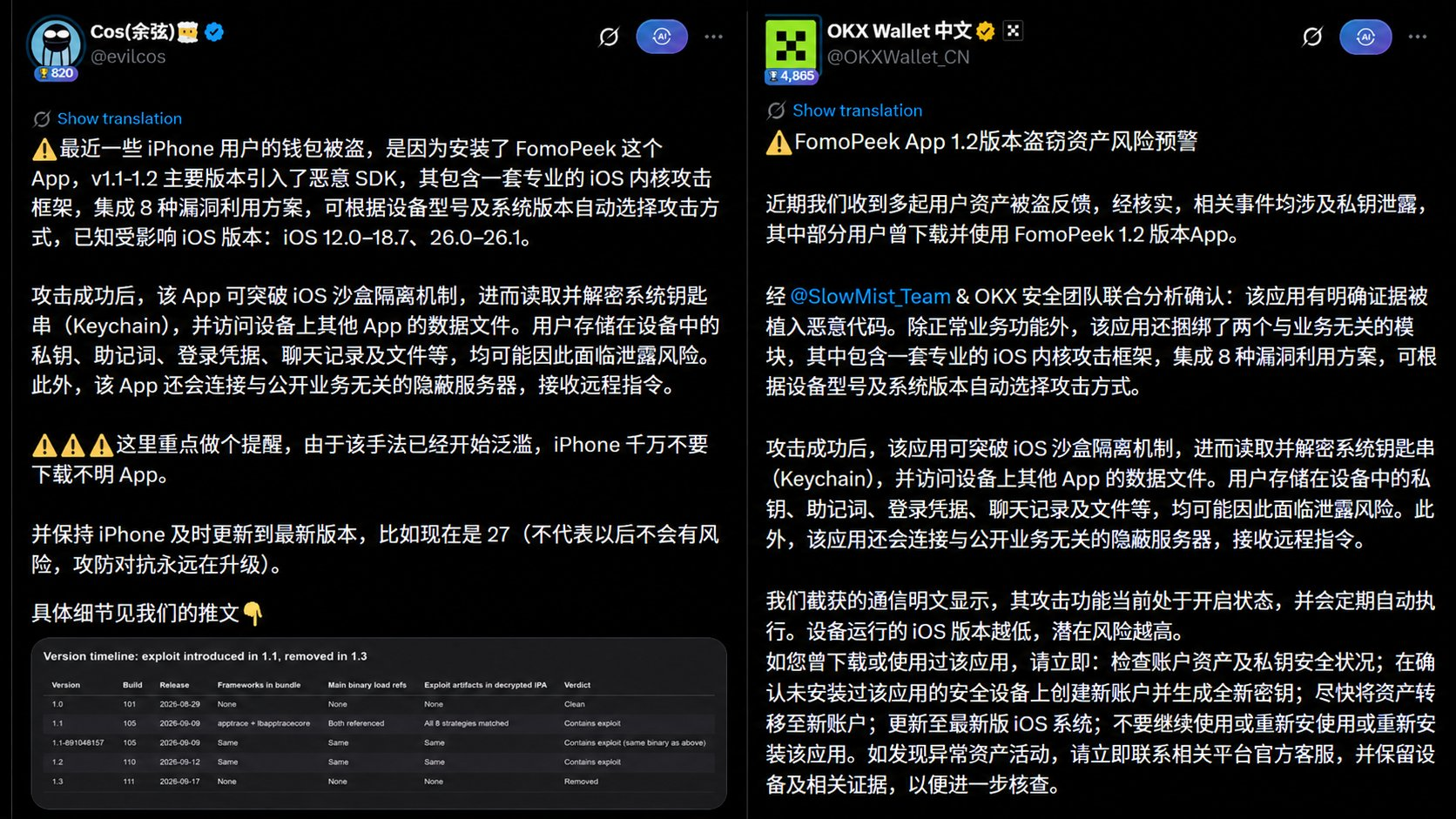
Reverse engineering revealed chilling details:
- Not a traditional phishing attack: users never pasted their seed phrases on any fake website, nor did they blindly sign on malicious contracts;
- Kernel-level exploit: the app bundled a set of iOS kernel exploit code capable of automatically escalating privileges across different device models and system versions;
- Sandbox escape and silent theft: it broke through iOS app sandbox restrictions, directly decrypted the system Keychain, and even scanned data from other wallets and system notes on the same device, silently transmitting plaintext private keys back to the hacker's server.

FomoPeek's previous iOS download page
This malicious incident directly shattered the crypto industry's illusion of "iOS App" security and exposed a brutal reality: the warfare in crypto's dark forest has escalated once again. You must update your methodology for protecting private keys.
02. A Full-Chain Breakdown of Hackers' New "Social Engineering Hunt"
The "fake airdrops, fake customer service, Twitter impersonation accounts" that hackers commonly used in the past can no longer fool veteran players today. As a result, hacker teams have shifted their attack focus to more sophisticated social engineering orchestration chains:
🔗Spending big on KOL sponsored deals ──> Launching rebates and genuine features ──> Users install on their phones ──> Exploiting phone system vulnerabilities to drain private keys
Phase 1: "Buying Out" KOLs' Reputation Assets
Many bloggers and KOLs lack reverse engineering or code auditing skills, and when faced with advertising budgets of thousands or even tens of thousands of USDT plus rebate commissions, they easily let their guard down. Retail investors see researchers and traders they've followed for a long time tweeting recommendations, and their psychological defenses crumble instantly: "The big names are using it, so it must be safe."

Phase 2: Using "Practical Features + Small Rebates" as Bait
Previous phishing websites were obviously malicious shells the moment you clicked on them, but this malicious app's front-end features not only genuinely exist and are practical, but also come with an "invite rebate mechanism." Tempted by the prospect of "monitoring the market while earning dozens of USDT in daily rebates," retail investors completely lose their vigilance about the software's underlying permissions.
Phase 3: Releasing the "Technical Poison Pill" at Peak Trust
The hackers didn't strike on day one, but instead waited for the install base to grow and for target whales' assets to accumulate. The malicious code doesn't even need to stay in the foreground; it exploits system vulnerabilities to silently escape the sandbox, read the Keychain, dig through local notes, and package up users' wallet private keys to carry away.
03. Core Tutorial: The Ultimate Web3 Private Key Protection Guide
Given that hackers' social engineering schemes and system 0-Day vulnerabilities are impossible to fully defend against, how can ordinary players protect themselves?
⭐The answer is simple yet difficult: protect your private keys well.
Establish a "multi-layered defense and physical isolation" system to ensure that even if you're misled by some KOLs, even if you download a malicious app, hackers physically cannot reach our private keys.
First Line of Defense: Maintain Device and System Hygiene
The fundamental reason the FomoPeek attack succeeded was that iOS system vulnerabilities were breached. Apple's ecosystem myth was also exposed in this incident.
👇 Apple iOS's Failures and Negligence
- Review mechanism failure: Many people firmly believe that "anything listed on the App Store is safe," but hackers easily bypassed Apple's manual and automated reviews through dynamic command delivery, covert obfuscation of secondary business modules, and other methods, allowing a malicious app with a kernel attack framework to flow openly through the official store.
- Delayed vulnerability response and patching: The "sandbox isolation" that iOS has long touted is not impregnable. Many of the kernel vulnerabilities hackers exploited had long been circulating on the dark web or in security circles, and Apple is not aggressive about pushing security patches to older system versions, directly resulting in a large number of iPhones stuck on outdated iOS versions becoming hackers' "ATMs."
👇 Principles for Self-Cleaning Your Device Environment
- Keep your system up to date — don't complain about updates being a hassle: In Web3, every minor system version update is essentially patching the 0-Day / N-Day kernel attack chains that hackers are exploiting. Staying on an old system is like walking through the dark forest at night with no clothes on.
- Don't download random apps: Any non-essential, non-top-tier, non-open-source niche market-monitoring tools or auxiliary utilities should never be installed on your primary phone that holds assets; installing unknown "configuration profiles (Mobileconfig)" or web-based enterprise-signed apps is strictly forbidden.
- Don't jailbreak: Jailbreaking is equivalent to voluntarily closing the last security door of your operating system.
Second Line of Defense: Seed Phrases Must "Never Leave a Digital Trace"
A major characteristic of many malicious programs is scanning local unencrypted notes. Many victims believe they "never sent their seed phrase to anyone," but in reality, for convenience, they long ago stored those 12 words in their iPhone's local passwords, notes, photo album, or messaging apps.
👇"Streaking" behaviors that must be prohibited
- ❌ Screenshots / photos stored in the album: Modern phone albums come with OCR text recognition and automatic cloud sync, making them extremely easy for apps with stolen permissions to extract;
- ❌ Stored in notes, Notion, cloud drives, or email drafts: As long as the device sandbox is breached, these files are all running naked in plaintext;
- ❌ Sending to WeChat's "File Transfer" or TG's "Saved Messages";
- ❌ Copy-pasting seed phrases between computer and phone: Input methods and background clipboard monitoring scripts can grab clipboard contents within milliseconds.
👇 Correct and standardized physical backup practices
- ✅ Offline physical handwriting: In a private space without cameras, handwrite on paper cards and double-check twice;
- ✅ Metal seed phrase plates (Crypto Steel): For core assets, paper is susceptible to moisture and corrosion. Use stainless steel or titanium alloy letter plates stamped and sealed, fireproof, waterproof, corrosion-proof, and stored in two separate locations.
Third Line of Defense: Tiered Asset Allocation and "Dedicated Devices"
Putting all your assets in the same phone wallet to try new tools and ape into shitcoins is no different from walking through a chaotic market covered in gold. Therefore, physical-level fund isolation must also be established.
👇 Implement a "3:5:2" asset tier structure
[Cold Storage / Vault] 70%–80% large funds ──> Hardware cold wallet / multi-sig Safe, private keys never touch the internet, never participate in daily authorizations │
[Interaction Relay / Warm Wallet] 15%–20% medium-to-short-term funds ──> Clean independent PC browser extension, interacting only with top-tier audited mainstream protocols │
[Dedicated Authorization / Hot Wallet] 5%–10% interaction wear-and-tear funds ──> Independent backup phone / hot wallet, dedicated to aping shitcoins, trying new tools, and farming airdrops │
📱 Set up a "poison-testing dedicated device" to achieve physical environment isolation
- Primary asset phone (vault phone): Only install the native phone system, official authenticators, and hardware wallet companion apps. Absolutely do not install any niche market-monitoring software, auxiliary plugins, or front-running scripts, and don't join random groups.
- Poison-testing phone (backup phone): Prepare an idle backup phone specifically for browsing Twitter, trying new tools recommended by KOLs, running rebate bots, etc. Even if this device's sandbox is breached and it's completely hacked, it only holds a few dozen USDT in wear-and-tear funds — the main vault remains untouched.
Fourth Line of Defense: Permission Reduction and Signature Defense
Even if your private key isn't stolen, phishing hackers can still drain your funds by tricking you into signing.
👇 First, distinguish between signature types:
- Transfer directly moves tokens out;
- Approve grants token allowances to a specified smart contract (never grant unlimited approvals to unknown protocols);
- Permit / Permit2 are gasless offline authorization signatures, which scam websites love to disguise as "Connect Wallet" or "Claim Airdrop." Before signing, always check the Spender (authorized party) and the deduction amount.
👉 Use transaction simulation plugins: Install Rabby Wallet or browser extensions like Scam Sniffer and Pocket Universe to clearly view asset change simulations before clicking;
👉 Regularly revoke approvals: Visit Revoke.cash weekly or monthly to clear approvals for protocols you no longer use.
Fifth Line of Defense: "Self-Review" of Daily Interactions
In the dark forest, the best defense is to control your hands. Every time a KOL recommends a new project, you're tempted by high rebates, or you're about to download a new app or click to sign, you must complete the following three-step self-review:
👇 See through social engineering traps
- Check promotion frequency: Has this tool suddenly been heavily promoted by a large number of KOLs within 1–2 days?
- Examine the business logic: Is it using extremely high rebates and incentivized referrals to mask its real profit model?
- Break the endorsement illusion: Always remember that "a KOL sponsored deal is just an advertisement" — DYOR.
👇 Isolate your operating environment
- Primary phone veto: Never install any new-to-you app or script on your primary phone that holds large main assets.
- Stick to the poison-testing backup phone: Have you truly used an independent idle backup phone when trying new tools or playing with small rebates?
- Beware of sensitive permissions: Is the software luring you to install an unknown "configuration profile (Mobileconfig)," enterprise signing certificate, or to install outside the app store? Terminate immediately upon such requests.
👇 Guard the private key boundary to the death
- Clean local traces: Have your phone's notes, album, screenshot recycle bin, and clipboard been thoroughly cleaned, with no seed phrase remnants whatsoever?
- Core vault physically offline: Are all large core assets safely stored in hardware cold wallets, and have the seed phrases never been input back into a phone or computer?
- Minimize hot wallet balances: Does the current outpost wallet you use for interactions only hold minimal wear-and-tear funds (top up as needed, no pain if stolen)?
04. Summary
Decentralization gives us complete ownership of our assets, but the price is: the bank's risk control and the branch's security are ultimately borne by you alone. We must take responsibility for our own wallets and our own on-chain assets.
As hacker tactics escalate from "low-level phishing" to "KOL social engineering brainwashing + underlying kernel exploitation," blindly trusting device brands or influencer endorsements no longer works. To counter this kind of high-dimensional hunting, the most effective weapon isn't complex hacking techniques, but the most basic institutions and discipline:
Stay skeptical of social media marketing, isolate your device environments, keep seed phrases completely offline, and let large assets reside in secure chips.
Don't chase petty gains, guard the private key boundary to the death, and you'll be able to navigate through bull and bear markets in Web3's dark forest.