






BAIclaw 使用全攻略:從零基礎安裝到AI Agent進階玩法,零程式碼輕鬆上手


- 核心觀點:BAIclaw 是一款桌面級 AI Agent 終端,透過圖形化拖拽介面取代傳統命令列操作,大幅降低使用門檻,旨在讓非技術用戶也能輕鬆實現 AI Agent 的配置、調度與管理。
- 關鍵要素:
- 零程式碼操作:使用者無需編寫程式碼,透過簡單的圖示拖拽和點擊即可完成 AI Agent 的下載、安裝、配置及啟動運行,全程僅需三步。
- 效率顯著提升:實測數據顯示,BAIclaw 可將 AI Agent 的使用效率提升 90% 以上,將專業工具轉變為大眾可用的個人助理。
- 多模型統一調用:支援透過單一 B.AI API Key 一站式調用 GPT、Claude、Gemini 等全球及國內多種 AI 模型,並支援任務級即時切換,無需重啟或修改配置。
- 全場景技能生態:已內建 66+ 預置 Skills,涵蓋日常辦公、資訊整理等 Web2 場景,以及鏈上數據查詢、DEX 交易等 Web3 場景,同時支援接入 Telegram 等 6 大社交平台實現自動化響應。
- Web3 智能錢包:可為 AI Agent 賦予獨立錢包(Agent Wallet),使其具備自主支付、資產轉帳、交易等經濟自主權,實現自動化鏈上協作。
- 多智能體管理:支援創建和管理多個具備不同技能的 AI Agent,支援多智能體間協作與任務並行處理。
When using traditional AI Agent platforms like OpenClaw and Hermes, users often need to input complex code commands through a computer terminal for configuration and operation, which has a very high barrier to entry. For example, calling OpenClaw requires manually entering "OpenClaw Gateway Start" to restart the gateway service; changing the AI model API requires modifying the underlying configuration file, and any slight mistake can cause service anomalies. This command-driven operation mode is not only time-consuming and laborious but also makes it difficult for non-technical users to smoothly use AI Agents.
The AI Agent infrastructure B.AI has launched a desktop-level AI Agent intelligent terminal, BAIclaw, which brings a brand new change to this situation. It redefines the interactive experience of AI Agents, significantly lowering the barrier to entry and making the use of AI Agents easier and more convenient.
BAIclaw takes "out-of-the-box" as its core design philosophy. Built on the core technologies of OpenClaw and ClawX, it transforms the traditional complex terminal command-line operations of AI Agent platforms like OpenClaw into an intuitive and simple graphical interface. Core functions are encapsulated as draggable components, allowing users to complete the entire AI Agent workflow by simply dragging and clicking icons without needing code skills, greatly simplifying user operations.
With this desktop application, BAIclaw, users can quickly master the use of AI Agents, whether they have zero coding foundation or are technical experts. From download and installation to API configuration and startup, the entire process only requires three steps and zero-code operation to easily achieve the automated execution and deployment of AI Agents, easily unlocking the efficiency and convenience brought by AI.
Tests have shown that BAIclaw can improve the efficiency of using AI Agents by over 90%, truly transforming AI Agent from a professional tool into an all-purpose personal assistant usable by everyone, allowing AI technology to truly serve every person and every scenario, thereby promoting the comprehensive deployment of AI Agents.
Beyond simplifying AI Agent operations, BAIclaw excels in core capabilities, balancing "efficient scheduling of multiple AI models" with "flexible adaptation to multiple application scenarios." It supports unified invocation of multiple world-leading AI models globally through a single API Key, and its application scenarios cover full-stack services from Web2 to Web3, highlighting its core advantages.
In terms of model scheduling, BAIclaw comes with a built-in API Key for the B.AI LLM Service. Through a single B.AI API Key, users can access global top-tier models like GPT, Claude, Gemini, as well as domestic cost-effective big model APIs like MiniMax, GLM, and Kimi, all from one stop. It also supports real-time task-based switching without needing to restart or modify configurations.
In terms of specific application scenario execution, BAIclaw covers Web2 and Web3 full-scenario services. It comes pre-installed with 66+ practical Skills, covering Web2 scenarios like daily office work, information organization, scheduled reminders, and web monitoring, as well as Web3 operations such as on-chain data queries, DEX trading, and encrypted asset management. Users can activate them directly. It also supports integration with 6 major mainstream communication tools like Telegram, Discord, and Slack, enabling 7×24 hour unattended automated response needs.
More notably, BAIclaw can add a Web3 smart wallet, Agent Wallet, to an AI Agent, allowing each AI Agent to have an independent address identity and autonomous settlement financial functions, granting it true economic autonomy to achieve payment and automated task collaboration between AI Agents. Combined with built-in Web3 Skills like x402 payment, SunSwap DEX, TronScan, and SunPerp, even users without encryption knowledge can issue commands to an AI Agent through conversation to automatically complete complex on-chain operations such as purchasing resources, recharging fees, transferring assets, DEX swapping, LP management, and perpetual contract trading.
BAIclaw Zero-to-Hero Guide: Getting Started with AI Agent in Three Steps
The process from downloading to launching BAIclaw is extremely simple. No complex backend code or command-line operations are required throughout the entire process; you can quickly get started using an AI Agent in just three steps.
Step 1: Download and Installation
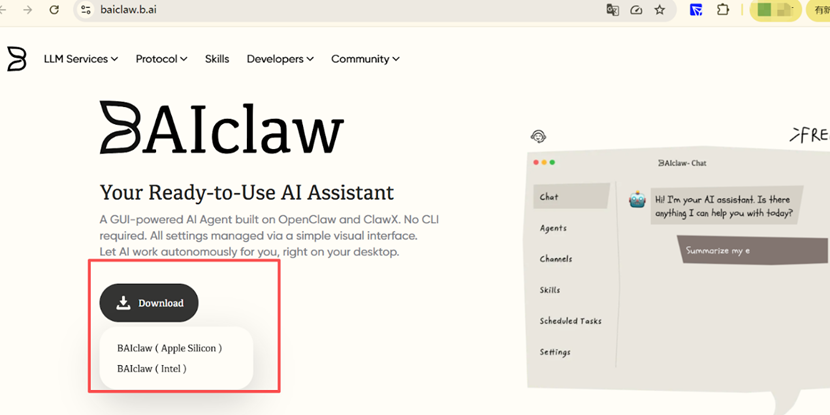
1. Download the BAIclaw Installation Package: Visit the B.AI official website, navigate to the BAIclaw page, and download the installation package for the corresponding version. Currently, BAIclaw only supports the MAC system, with plans to support more systems in the future. Two versions are now available for MAC users to choose from based on their chip type:
BAIclaw (Apple Silicon): Compatible with Apple ARM chip architecture devices, such as Apple M1/M2/M3 and subsequent models;
BAIclaw (Intel): Compatible with Apple Intel chips, such as Apple Pro and other devices.
2. One-Click Installation: Drag the downloaded installation package into the Mac's "Applications" folder to complete the installation. Once successfully installed, you can find the BAIclaw icon in the "Launchpad" or "Applications" directory.


