Web3 생존 가이드 01 | 개인키/시드 구문과 지갑 비밀번호, 도대체 무슨 차이가 있을까?


- 핵심 요점: 이 글은 Web3 핵심 보안 개념을 알기 쉽게 설명합니다. 개인키는 체인 상 자산을 통제하는 유일한 증명이며, 시드 구문은 개인키의 읽을 수 있는 백업 형태이고, 지갑 비밀번호는 앱 잠금 해제에만 사용됩니다. 사용자는 거래소 계정(플랫폼托管)과 자체托管 지갑(사용자가 개인키 관리)을 구분하고, 시드 구문 오프라인 백업 등의 보안 조치를 취해야 합니다.
- 핵심 요소:
- 지갑의 본질은 개인키를 관리하는 '열쇠 상자'이며, 자산은 실제로 블록체인에 기록됩니다. 개인키 분실 또는 유출은 자산 손실로 이어집니다.
- 개인키와 시드 구문은 본질적으로 동일합니다. 시드 구문은 12개 또는 24개의 단어로 구성되어 사용자가 지갑을 쉽게 백업하고 복구할 수 있도록 합니다.
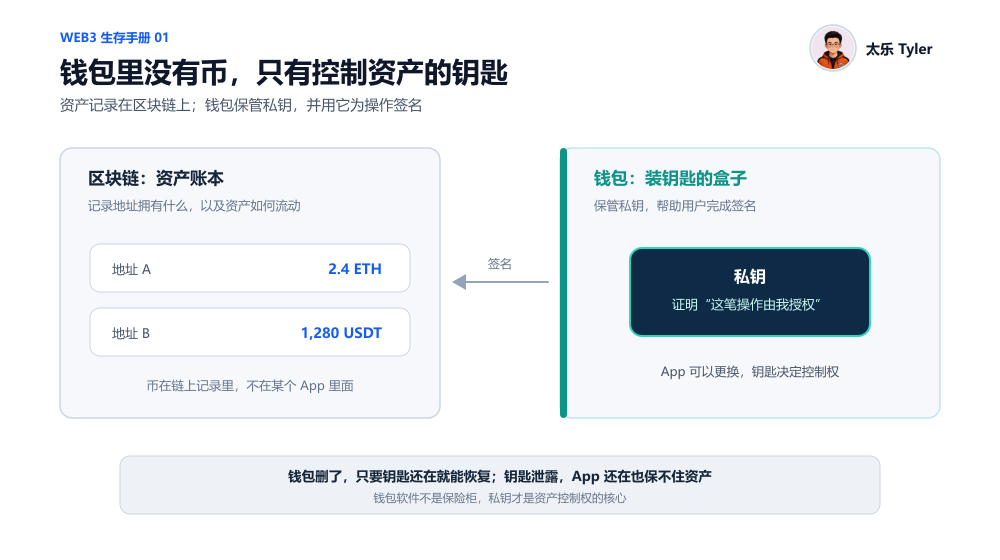
- 지갑 비밀번호(PIN 코드)는 로컬에서 앱을 잠금 해제하는 용도로만 사용되며, 분실 시 개인키/시드 구문을 이용해 재설정할 수 있습니다. 개인키를 분실하고 지갑을 열 수 없는 경우 자산을 되찾을 수 없습니다.
- 중앙화 거래소 계정 자산은 플랫폼이托管하며, 사용자는 계정 비밀번호와 2차 인증으로 관리합니다. 독립적인 개인키는 없습니다. 개인키 유출이 반드시 도난을 의미하는 것은 아니며, 이는 사용자 책임과 위험 분배의 차이에 해당합니다.
- 거래소가 제공하는 'Web3 지갑'은 플랫폼 계정 자산의 통제권과 분리되어 있으며, 시드 구문을 별도로 백업해야 하고 플랫폼이 찾아줄 수 없습니다.
- 핫월렛의 개인키는 인터넷에 연결된 기기에 저장되고, 콜드월렛(하드웨어 월렛)의 개인키는 오프라인 기기에 저장됩니다. 하지만 하드웨어 월렛도 사용자가 시드 구문을 스스로 유출하는 것을 막을 수는 없습니다.
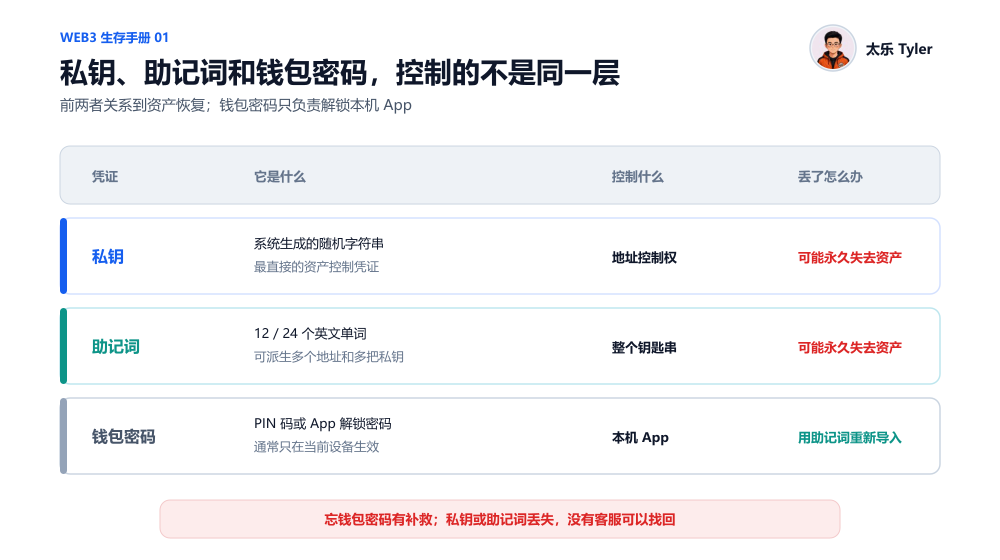
- 클라우드에 시드 구문을 저장하면 바이러스 감염, 계정 유출 및 앱 리딩 권한 위험이 있습니다. 큰 금액의 자산은 종이나 금속판에 손으로 적고, 독립적이고 안전한 위치에 여러 곳에 오프라인 백업하는 것을 권장합니다.
I often help newcomers to Web3 by answering their questions, and I've encountered a wide variety of issues.
Some people ask, "Can I recover my wallet if I accidentally delete it or forget my password?" Others take screenshots of their seed phrases and save them in their photo albums, thinking it's safe as long as they don't send them to anyone. Some people still can't tell the difference between a trading platform account and a wallet they've downloaded themselves.
These questions might seem basic, but in reality, even people who have used wallets for years may not fully understand them.
So, I plan to start a new series called "Web3 Survival Guide." I'll try to avoid jargon as much as possible and focus specifically on problems that seem small but are actually very important, helping everyone gradually understand and use Web3.
This article is the first chapter of the "Web3 Survival Guide." Let's start with the most important thing: what exactly is the difference between a private key, a seed phrase, and a wallet password?
1. First, Remember This: There Are No Coins in a Wallet
Many people think their BTC, USDT, ETH, or other tokens are "stored in their wallet."
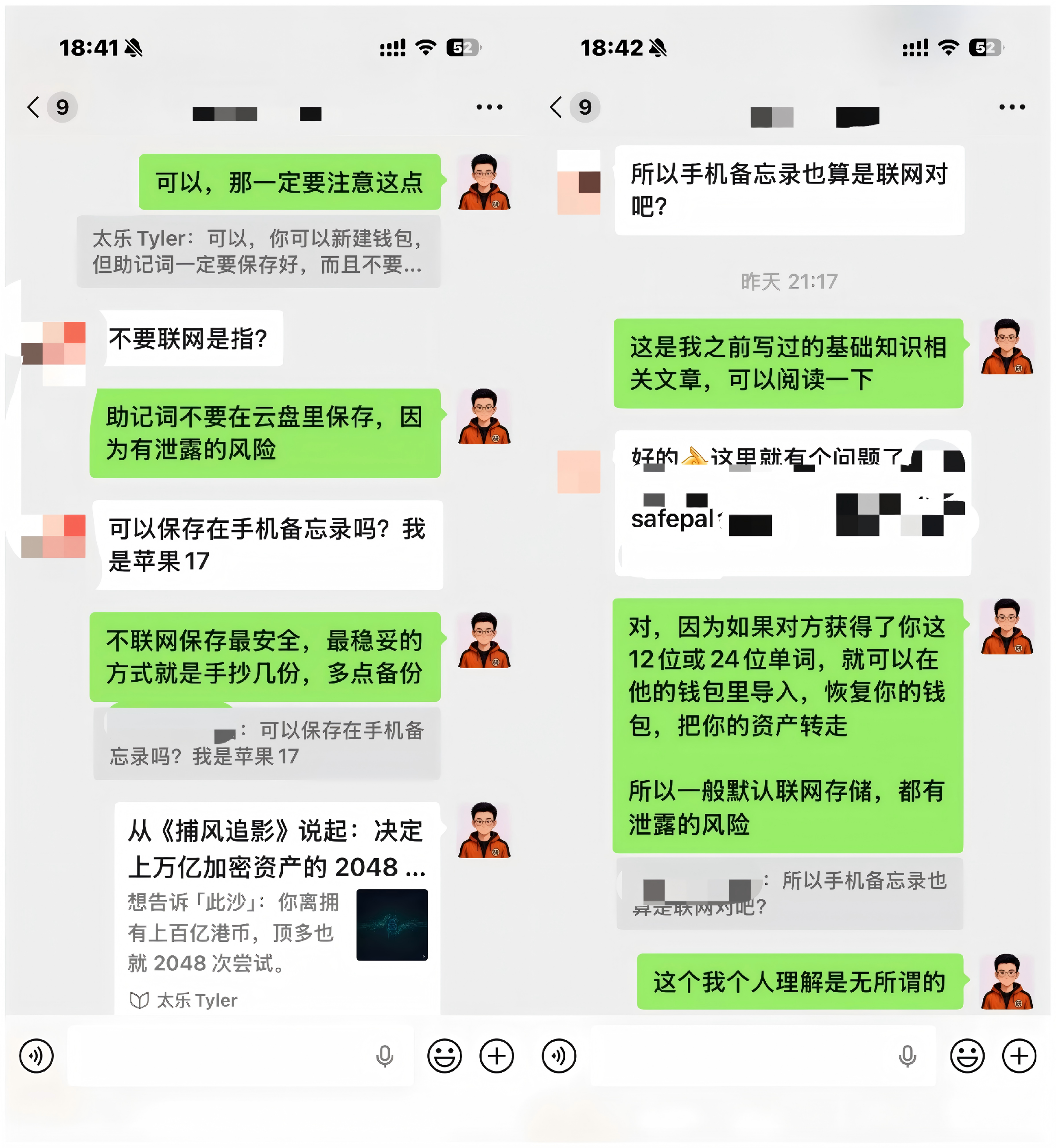
But strictly speaking, the assets are not inside the wallet app. They are recorded on the blockchain. In other words, the wallet you use, whether it's MetaMask, OKX, SafePal, TP, or imToken, is more like a toolset to help you hold your keys, not a safe for storing assets.
- The blockchain is responsible for recording how many assets a specific address holds, where those assets came from, and where they are sent.
- The wallet is responsible for helping you hold the "keys" to that address and helping you transfer assets in and out of that address.
For example, when you transfer, swap tokens, or authorize a dApp, the wallet uses the private key stored inside to sign the transaction. This proves to the blockchain that the person controlling the address has indeed agreed to perform this operation.
Therefore, a wallet app isn't a safe for holding coins; it's more like a box for holding keys. The truly valuable thing is the key (private key) inside, not the box itself.
This also explains two things that many people find hard to understand:
- Even if the original wallet app goes bankrupt, is delisted, or you accidentally delete it, as long as you have a backed-up correct private key, you can download another wallet, import the private key again, and recover everything. This is because the industry currently uses the same set of technical standards, and the import logic of different wallets is interoperable. It's like putting the same key in a different box; the lock will still open.
- If someone else gets your private key, even if your phone is still in your hand and the wallet app hasn't been deleted, they can still move your assets. This is because they can import this key into their own wallet, and the blockchain only recognizes the key, not who holds it.
2. What Exactly is the Difference Between a Private Key, Seed Phrase, and Wallet Password?
Since the private key is so important, what is a seed phrase?
Actually, the seed phrase was created primarily to make it easier for ordinary people to back up their wallets. The private key is a string of characters randomly generated by the system. It's long and chaotic, making it easy to make mistakes when manually copying, and almost impossible for ordinary people to memorize directly.
Therefore, the industry adopted a universal standard to "convert" private keys into a seed phrase composed of 12 or 24 English words.
In other words, the private key and the seed phrase are essentially the same key, just in a different format. To elaborate a bit: in theory, one set of seed phrases can derive multiple private keys. For easier understanding, think of the private key as a specific key, and the seed phrase as a master backup of a keychain (I also discussed why seed phrases are usually generated from a fixed word list and the basic logic behind it in the article "Starting from 'Catching Shadows': The 2048 Words that Decide Trillions in Crypto Assets", which interested readers can check out).
Most mainstream wallets today prompt users to back up their seed phrase during creation. It's rare for them to directly ask ordinary users to copy a long string of private keys.
However, whether it's a private key or a seed phrase, you must never tell anyone. Under normal circumstances, no one, whether it's wallet customer service, project teams, or exchange staff, will ask you to send them your private key/seed phrase. If anyone asks for your private key under the pretext of 'wallet verification,' 'lifting risk controls,' 'claiming an airdrop,' or 'helping recover assets,' you can essentially treat it as a scam.
So, what is a wallet password?
A wallet password, such as the PIN code or unlock password you set when opening the app, is only used to unlock the app itself. It's similar to a phone screen lock and is completely different from a private key or seed phrase.
You can remember a simple rule:
- If you forget your wallet password, it's fine. You can re-import your private key/seed phrase and set a new password.
- If you lose your seed phrase, but can still open the original wallet, you still have a chance to back it up again or transfer your assets.
- If you lose your seed phrase AND can't open the original wallet, it might be truly unrecoverable.
- If your seed phrase is compromised, you should immediately transfer your assets to a completely new wallet.
3. Why Don't Exchange Accounts Have Seed Phrases?
Many people first encounter cryptocurrency on exchanges like Binance, OKX, or Bybit. At this point, they might wonder, "I also have BTC, ETH, USDT, and USDC on the exchange. Why didn't I get a seed phrase?"
This is because assets held on a centralized exchange are usually not directly controlled by you via a private key/seed phrase; they are managed by the exchange on your behalf.
When we log in to an exchange, we typically use a phone number/email plus a login password, along with 2FA tools like SMS codes or Google Authenticator. The balance you see in your account is essentially an entry recorded by the exchange in its internal system, not a separate, independently controlled on-chain address.
The advantage of this method is its simplicity. Even if we forget our password, we can contact customer service, complete facial recognition, or identity verification to recover the account. However, the corresponding cost is that we need to trust the exchange to securely manage the assets and properly handle everyone's deposits and withdrawals.
A wallet is different. You hold the private key yourself, and control over the assets mainly rests with you. You can transfer funds whenever and to whomever you want, usually without going through exchange review. But at the same time, you are responsible for keeping your seed phrase safe, identifying phishing sites, and avoiding operational errors.
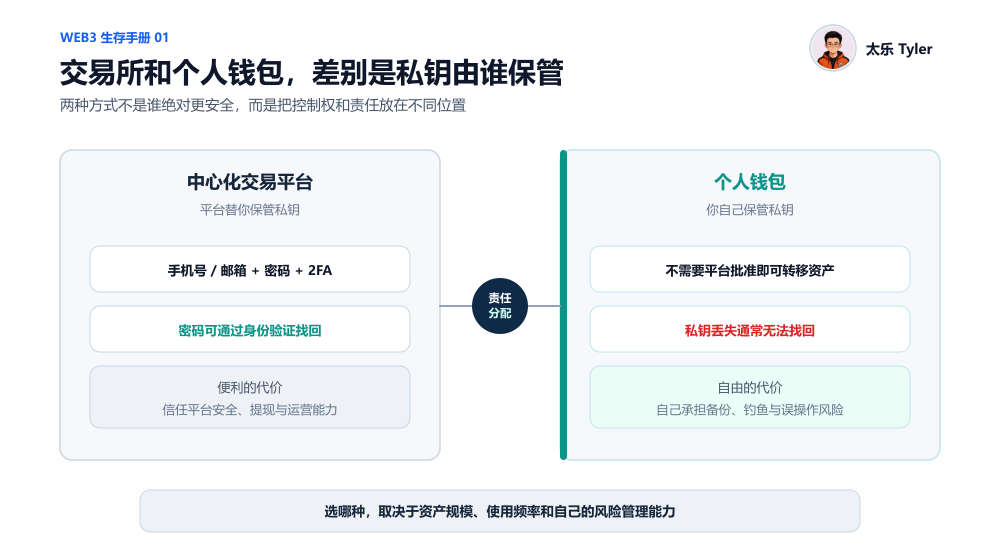
So, I always tell everyone, an exchange and a personal wallet are not about which one is inherently safer. They represent two different ways of distributing responsibility: Using an exchange means entrusting some of the security and custody responsibility to the platform. Using a wallet means taking control of your assets and the corresponding responsibilities back into your own hands.
Which one you choose depends on your asset size, usage frequency, and personal risk management ability.
However, there's another point of confusion today. Mainstream exchanges usually offer both an "exchange account" and a "Web3 wallet." For example, in the same Binance or OKX app, you can log into your exchange account and also create a self-custodial wallet that requires backing up a seed phrase.
Although the entry points are together, they are not the same account, and the way the assets are controlled is completely different. The judgment criteria are simple. If the wallet requires you to independently back up the seed phrase and explicitly states that the platform cannot recover it for you, then it belongs to a self-custodial wallet.
4. The Difference Between Hot and Cold Wallets Also Lies in the Private Key
Once you understand private keys/seed phrases, it's easy to distinguish between hot and cold wallets:
- Hot wallets: The private key is stored on a device connected to the internet. Signing is done through a phone or computer. Wallet apps provided by brands like MetaMask, OKX, SafePal, TP, etc., are usually hot wallets.
- Cold wallets: Hardware wallets are a common example of cold wallets. The private key is generated and stored on a dedicated offline hardware device. The private key never leaves the device during signing, e.g., Ledger, Trezor, OneKey hardware devices.
Of course, most projects making hardware wallets today also have their adapted software apps, like SafePal and OneKey.
It's important to note that a cold wallet doesn't mean the entire setup is never connected to the internet. More accurately, it means the private key itself never leaves the hardware device and is not directly exposed to the internet-connected phone or computer. The actual process is roughly:
- The phone or computer generates a transaction waiting to be signed.
- The hardware wallet signs it on the secure chip inside the device.
- The hardware wallet sends the signed result back to the phone or computer.
- The phone or computer broadcasts the transaction to the blockchain.
Throughout this process, the private key remains securely stored inside the hardware device's secure chip.
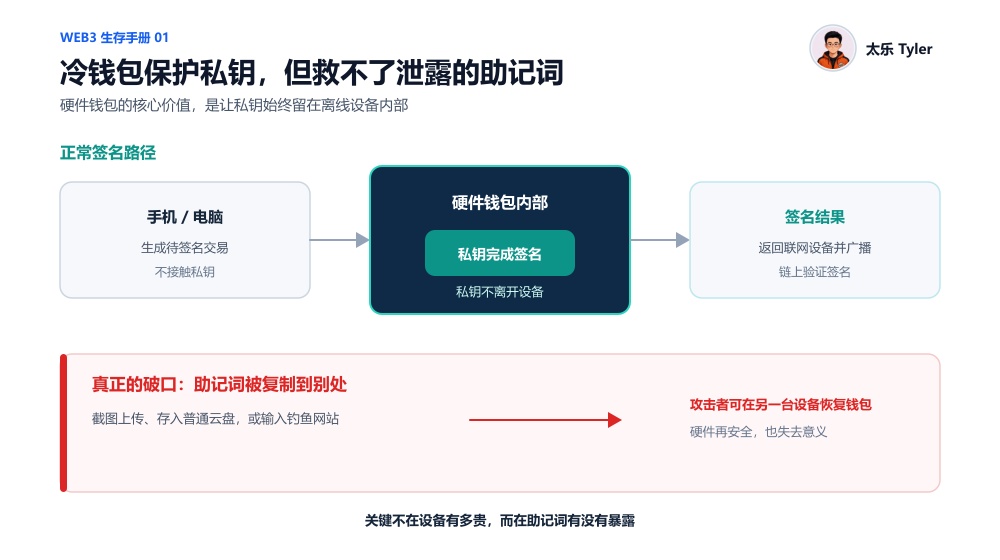
But a cold wallet, or hardware wallet, does not equal absolute security. If you take a photo of your hardware wallet's seed phrase, upload it, enter it into a phishing site, or mistakenly authorize a malicious contract, the hardware device's security is meaningless.
Ultimately, a hardware wallet protects the storage and signing environment of the private key, but it cannot protect against users actively leaking their seed phrase.
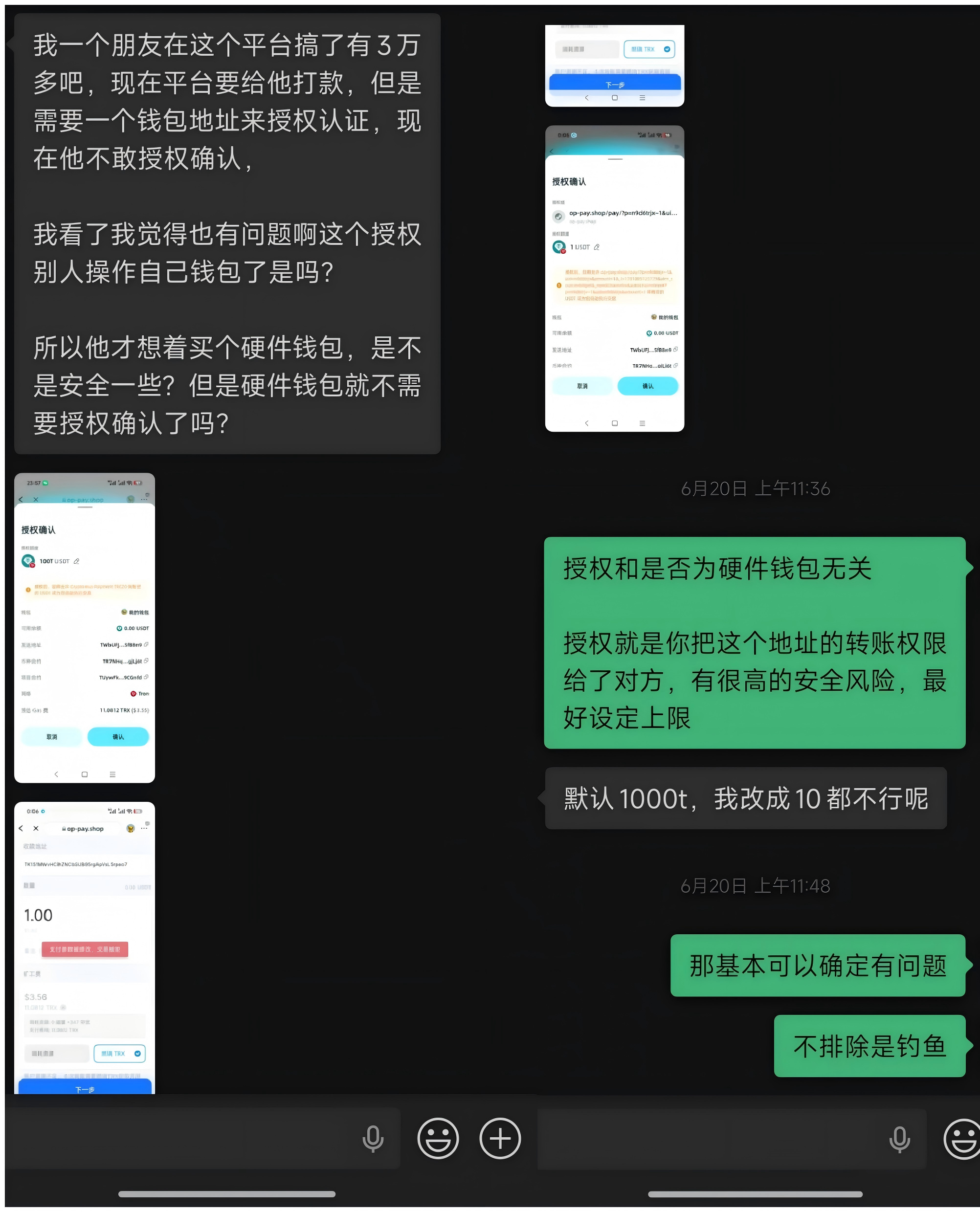
We'll discuss the specific choice between hot wallets and cold wallets/hardware wallets in detail in the next article.
5. Really, Can't I Save My Seed Phrase in Cloud Storage?
Some friends also repeatedly ask me: "Can't I just save my seed phrase in my phone's memo, as long as I don't send it to anyone?" "Is it safe to save it in Alipay's 'Steel Box' or an encrypted cloud drive?"
Objectively speaking, security problems are rarely a simple case of "will definitely be stolen" or "will definitely not be stolen." It's about different methods of storage corresponding to different probabilities of risk.
The biggest risk of storing your seed phrase in a regular memo, WeChat favorites, chat history, email, or photo album is that your phone could be infected with malware or remotely controlled, or your cloud account could be hacked. Photos and memos might sync automatically, certain apps might read your clipboard or local content, or data might not be completely wiped when you sell or repair your old phone.
Of course, tools with independent passwords and encryption might be safer than a regular photo album or memo. However, you still need to trust the corresponding app, your cloud account, and your password strength. A problem in any single link could lead to a leak.
So, for assets of significant value intended for long-term holding, it is still recommended to write down your seed phrase on paper or record it on a dedicated metal seed phrase backup plate (major hardware wallet providers usually offer similar steel plates; more on this in the next article). Store these backups in two relatively safe and independent locations.
Of course, offline storage also has its own risks, such as paper damage, loss when moving, fire, or water damage. So, a truly reasonable security solution involves multiple backups.
We'll discuss the details of storing crypto assets, the specific use cases, and the choice between hot wallets and cold wallets (hardware wallets) in the next article.