From Understanding Skill to Learning How to Build Crypto Research Skill


- Core Viewpoint: The article provides an in-depth analysis of the Agent Skill technology launched by Anthropic, detailing its evolution from a Claude-exclusive feature to a universal underlying design pattern in the AI Agent field. It focuses on explaining its fundamental differences from the MCP protocol and its synergistic application value in crypto investment research scenarios.
- Key Elements:
- Agent Skill was launched and opened as a standard by Anthropic at the end of 2025, aiming to modularize AI capabilities. It enhances task execution stability and efficiency through a "documentation" format, reducing the redundancy of prompt tuning.
- Its core operational mechanism is "progressive disclosure," which loads information in three layers (metadata, instructions, resources) on-demand, maximizing token savings while maintaining high efficiency. 'Reference' is used for conditionally triggering the reading of external knowledge, and 'Script' is used for executing external code.
- There is a fundamental difference between Agent Skill and MCP: MCP is a standardized "data pipeline" responsible for connecting to external data sources; whereas Skill is a "standard operating procedure (SOP)" responsible for standardizing how the model processes data.
- In practical crypto investment research, the two can form a powerful synergy, creating a "MCP supplies the water, Skill brews the wine" model. For example, using MCP to obtain on-chain data and news, and then using Skill to orchestrate workflows for automatically generating due diligence reports or discovering trading signals.
- This combination can build highly automated, professional workflows, such as rapid due diligence for new tokens (cross-verifying Twitter, sentiment, AI analysis) and real-time event-driven trading signal discovery (listening to news streams via WebSocket and triggering alerts).
Original Author: @BlazingKevin_, Blockbooster Researcher
1. The Birth Background and Evolution of Agent Skill
The AI Agent track in 2025 is at a critical watershed moment, transitioning from a "technical concept" to "engineering implementation." In this process, Anthropic's exploration of capability encapsulation unexpectedly catalyzed an industry-wide paradigm shift.
On October 16, 2025, Anthropic officially launched Agent Skill. Initially, the official positioning of this feature was extremely restrained—it was merely seen as an auxiliary module to enhance Claude's performance in specific vertical tasks (such as complex code logic, specific data analysis).
However, market and developer feedback far exceeded expectations. People quickly discovered that this "capability modularization" design demonstrated extremely high decoupling and flexibility in practical engineering. It not only reduced the redundancy of Prompt tuning but also greatly improved the stability of Agents in executing specific tasks. This experience quickly triggered a chain reaction within the developer community. In a short time, leading productivity tools and Integrated Development Environments (IDEs), including VS Code, Codex, and Cursor, followed suit, successively completing underlying support for the Agent Skill architecture.
Faced with the ecosystem's spontaneous expansion, Anthropic captured the underlying universal value of this mechanism. On December 18, 2025, Anthropic made an industry milestone decision: officially releasing Agent Skill as an open standard.
Subsequently, on January 29, 2026, the official released a detailed manual for Skill, completely removing the technical barriers for cross-platform, cross-product reuse from a protocol level. This series of actions marked that Agent Skill had completely shed its label as a "Claude-exclusive accessory" and officially evolved into a universal underlying design pattern within the entire AI Agent field.
At this point, a pressing question arises: What core pain points in underlying engineering does this Agent Skill, embraced by major companies and core developers, actually solve? And what are the fundamental differences and synergistic relationships between it and the currently hot MCP?
To thoroughly clarify these questions and ultimately ground them in the practical construction of crypto industry investment research, this article will progressively explore the following:
- Conceptual Analysis: The essence of Agent Skill and its foundational architecture construction.
- Basic Workflow: Revealing its underlying operational logic and execution flow.
- Advanced Mechanisms: In-depth analysis of the two advanced usages: Reference and Script.
- Practical Case Study: Analyzing the fundamental differences between Agent Skill and MCP, and demonstrating their combined application in Crypto investment research scenarios.
2. What is Agent Skill and Its Basic Construction
So, what exactly is Agent Skill? In the simplest terms, it is essentially a "dedicated instruction manual" that the large language model can refer to at any time.
In daily AI usage, we often encounter a pain point: every time we start a new conversation, we have to paste the long list of requirements again. Agent Skill was born to solve this hassle.
Take a practical example: Suppose you want to build an "Intelligent Customer Service" Agent. You can clearly write the rules in the Skill: "When encountering user complaints, the first step must be to soothe emotions, and absolutely no compensation promises should be made arbitrarily." Or, if you frequently need to do "Meeting Summaries," you can directly set the template in the Skill: "Every time a meeting summary is output, it must strictly follow the three sections: 'Attendees,' 'Core Topics,' and 'Final Decisions' for formatting."
With this "instruction manual," you no longer need to repeat that long string of instructions for every conversation. When the large model receives a task, it will automatically refer to the corresponding Skill and immediately know what standards to use for the job.
Of course, "instruction manual" is just a simplified analogy for easier understanding. In reality, Agent Skill can do much more than simple formatting rules; its "killer" advanced features will be detailed in later chapters. But in the initial stage, you can completely treat it as an efficient task specification.
Next, let's use the most familiar scenario of "meeting summary" to see how to actually create an Agent Skill. The entire process does not require complex programming knowledge.
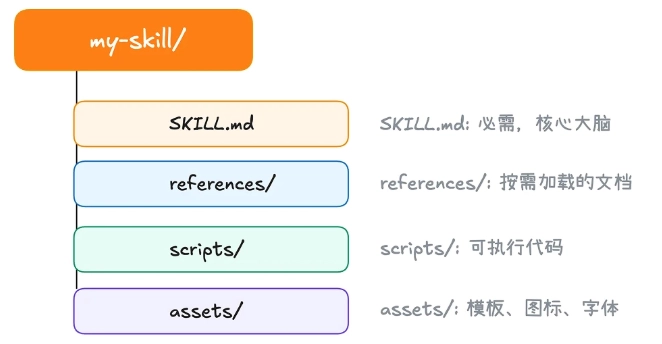
According to the settings of current mainstream tools (like Claude Code), we need to find (or create) a folder named .claude/skill in the computer's user directory. This is the "headquarters" for storing all Skills.
First step, create a new folder in this directory. The name of this folder is the name of your Agent Skill. Second step, inside the newly created folder, create a text file named skill.md.
Every Agent Skill must have this skill.md file. Its purpose is to tell the AI: who I am, what I can do, and how you should work according to my requirements. Opening this file, you'll find it clearly divided into two parts:
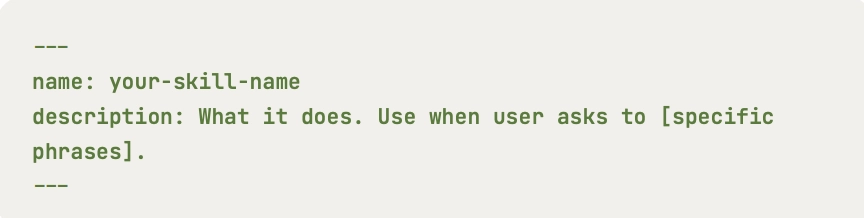
At the very beginning of the file, there is usually an area enclosed by two short dashes ---. This area only contains two core attributes: name and description.
name: This is the name of the Skill, which must be exactly the same as the outer folder name.description: This is an extremely important part. It is responsible for explaining the specific purpose of this Skill to the large model. The AI continuously scans the descriptions of all Skills in the background to determine which Skill should be used to answer the user's current question. Therefore, writing an accurate and comprehensive description is the prerequisite for ensuring your Skill can be accurately triggered by the AI.
The remaining part below the dashes is the specific rules written for the AI to see. Officially, this part is called "instructions." This is where you get to work; you need to describe in detail the logic the model needs to follow. For example, in the meeting summary case, you can specify here in plain language: "Must extract the list of attendees, discussed topics, and final decisions made."
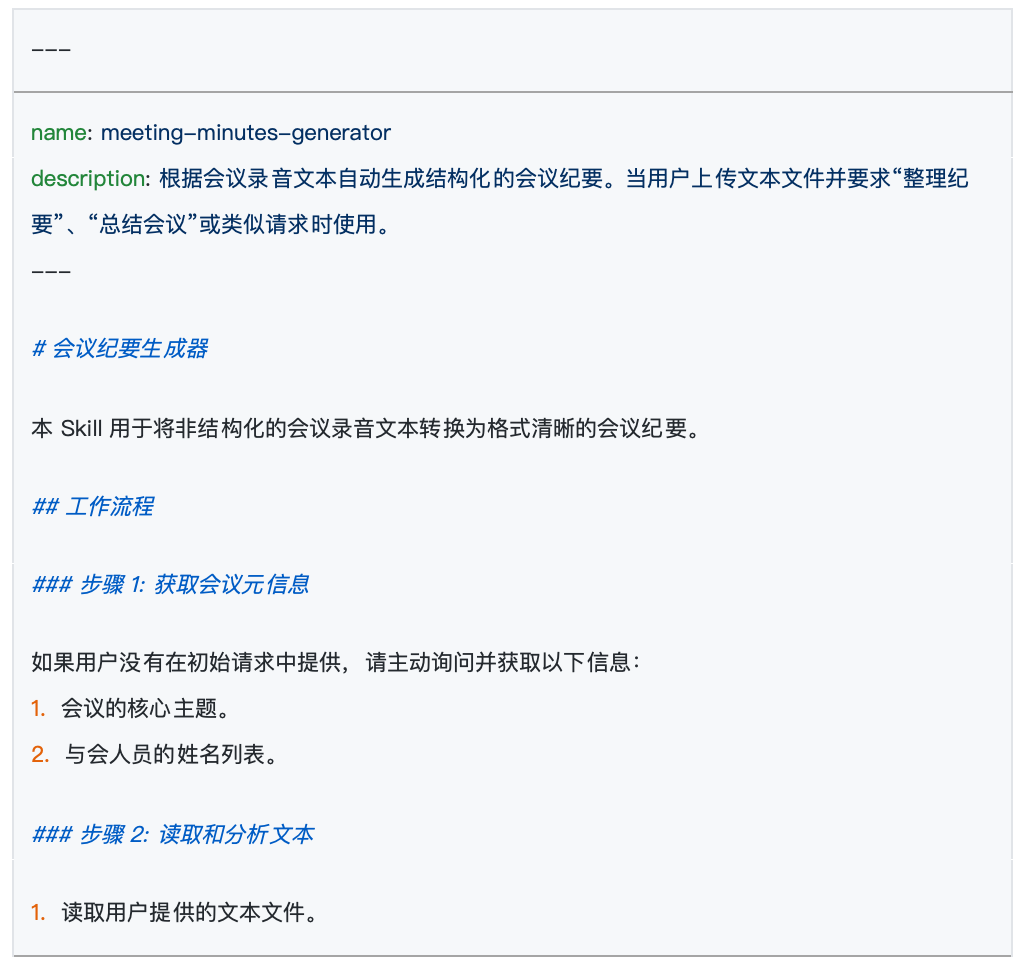
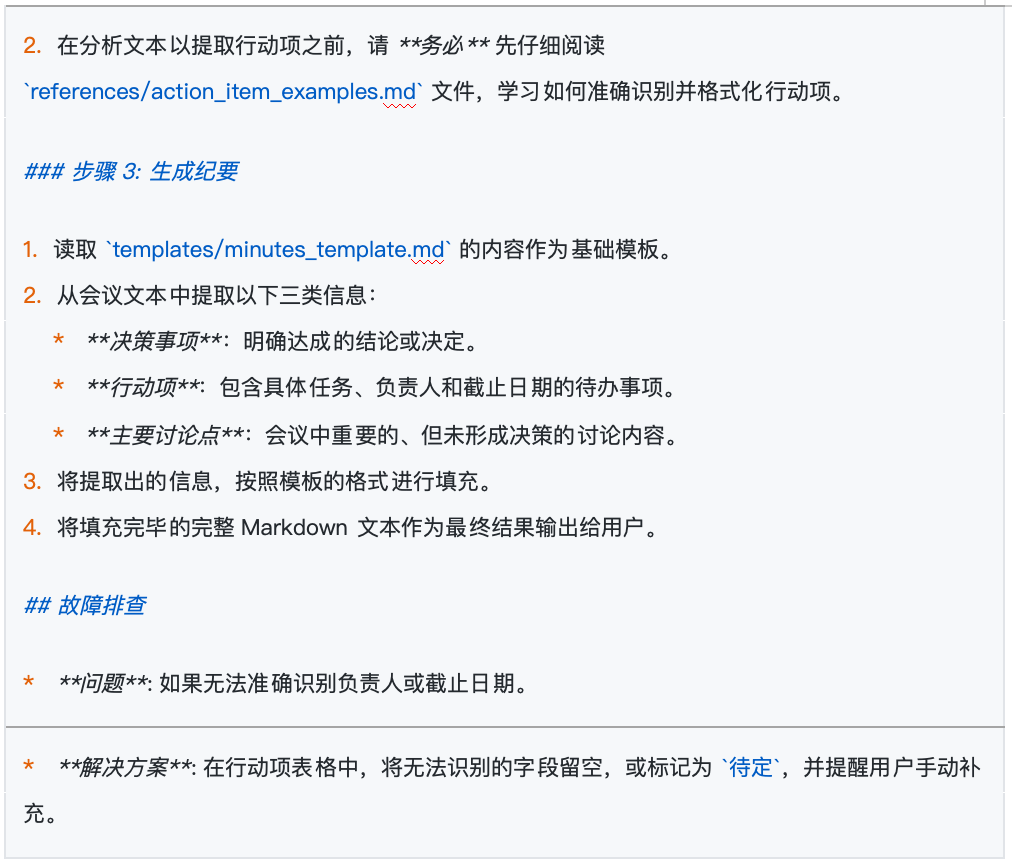
After completing these steps, a simple but very practical Agent Skill is born.
However, a truly useful Skill often begins with meticulous upfront design. Before typing the first word, clearly defining the goal, scope, and success criteria will make your construction process twice as effective.
The first step in building a Skill is not to think "what fancy things can I make the AI do," but to ask yourself: "What repetitive problems in my daily work do I actually need to solve?" It is recommended to start by concretely defining 2 to 3 clear scenarios that this Skill should cover.
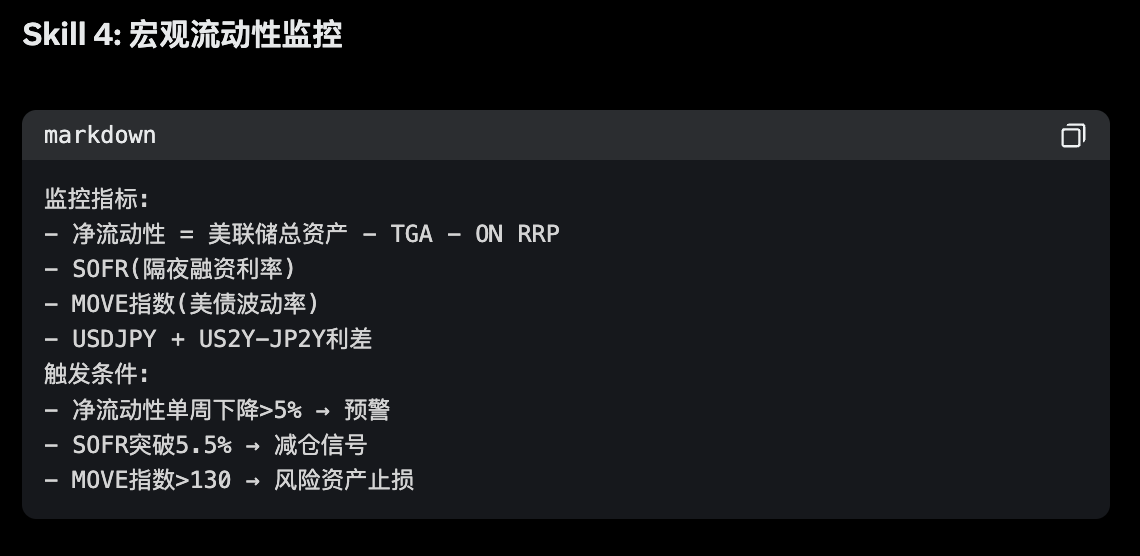
Secondly, define success criteria. How do you know if the Skill you wrote is good? Before starting, set a few measurable standards for it. For example, quantitative standards could be "whether processing speed has increased," and qualitative standards could be "whether the meeting decisions it extracts are accurate and complete every time without omissions."
3. The Basic Operational Workflow of Agent Skill
After understanding the basic appearance of Agent Skill, we can't help but ask: In actual operation, how does this "instruction manual" actually work?
If you've recently experienced products like Manus AI, you've likely encountered this scenario: When you pose a specific question, the AI doesn't immediately start "rambling" or hallucinating. Instead, it keenly realizes that "this matter falls under a specific Agent Skill." So, it pops up a prompt on the interface, asking if you allow the invocation of that Skill.
When you click "Agree," the AI then, as if it's a different person, strictly follows the preset rules to perfectly output the result.
Behind this seemingly simple "request-approve-execute" interaction lies an extremely sophisticated underlying operational workflow. To explain this mechanism thoroughly, we first need to clarify the "three core roles" interacting in the entire process:
- User: The person initiating the task request.
- Client Tool (e.g., Claude Code, etc.): The "middleman" responsible for scheduling and coordination.
- Large Language Model: The "brain" responsible for understanding intent and generating the final result.
When we input a requirement into the system (e.g., "Help me summarize this morning's project meeting"), the following four-step precise collaboration occurs between these three roles:
Step 1: Lightweight Scanning (Transmitting Metadata)
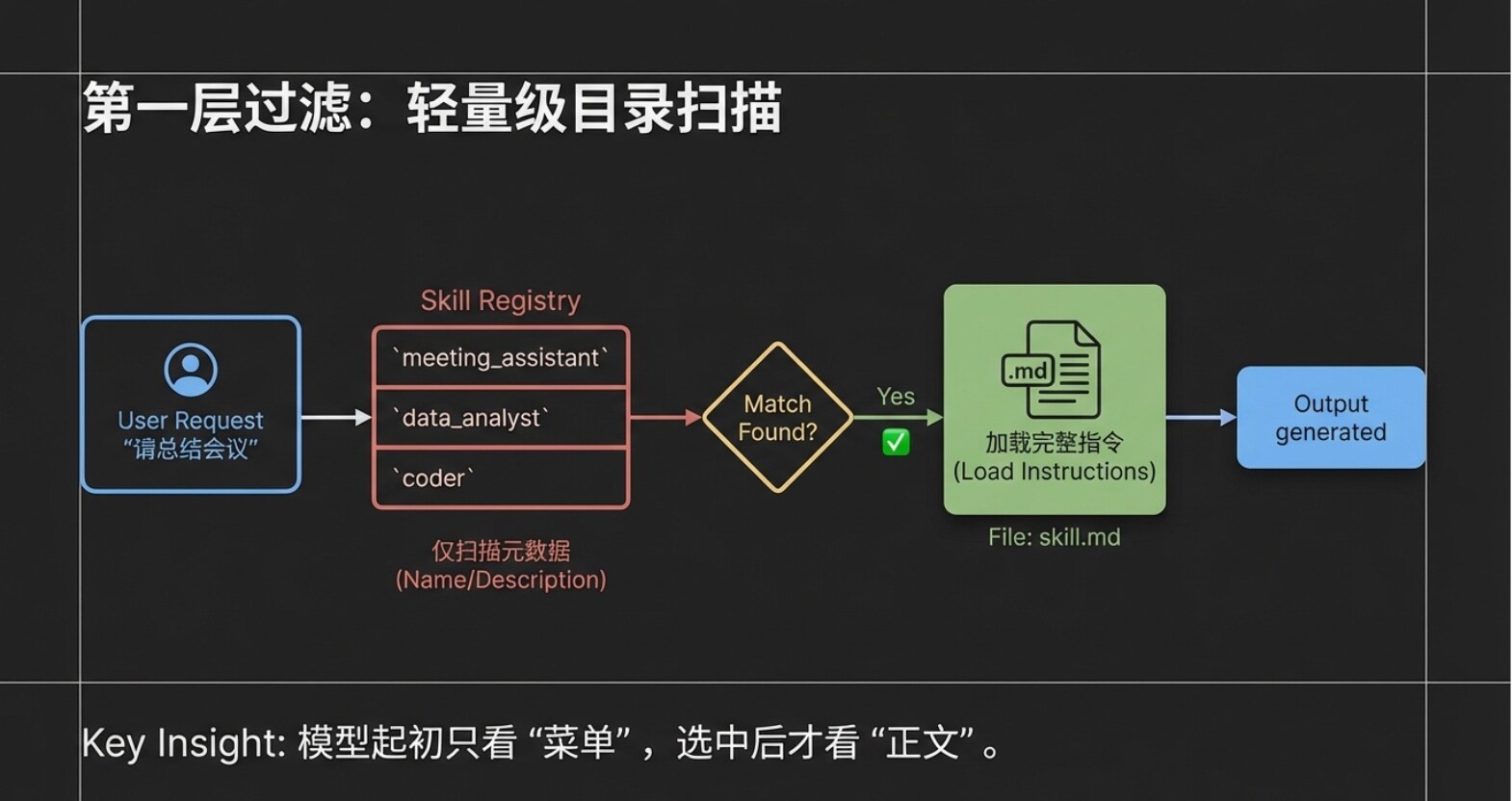
After the user inputs the request, the client tool (Claude Code) does not dump all instruction manuals to the large model at once. Instead, it only sends the user's request, along with the "names" and "descriptions" of all Agent Skills in the current system (i.e., the Metadata layer mentioned in the previous chapter), packaged together to the large model. Imagine that even if you have installed a dozen or even dozens of Skills, the model at this point only receives a "lightweight directory." This design greatly saves the model's attention, avoiding information interference.
Step 2: Precise Intent Matching After receiving the user request and this "Skill directory," the large model performs rapid semantic analysis. It finds that the user's request is to "summarize a meeting," and the directory happens to have a Skill named "Meeting Summary Assistant," whose description perfectly matches the task. At this point, the large model informs the client tool: "I found this task can be solved using the 'Meeting Summary Assistant'."
Step 3: On-Demand Loading of Complete Instructions After receiving feedback from the large model, the client tool (Claude Code) then truly enters the dedicated folder of the "Meeting Summary Assistant" to read the complete skill.md body. Please note, this is an extremely critical design: Only at this moment is the complete instruction content read, and the system only reads this one selected Skill. Other unmatched Skills remain quietly in the directory, not consuming any resources.
Step 4: Strict Execution and Output Response Finally, the client tool sends both the "user's original request" and the "complete skill.md content of the Meeting Summary Assistant" to the large model. This time, the large model is no longer making a choice; it enters execution mode. It will strictly follow the rules set in skill.md (e.g., must extract attendees, core topics, final decisions) to generate a highly structured response, which is then presented to the user by the client tool.
4. Core Mechanism One: On-Demand Loading and Reference
The workflow from the previous chapter introduces the first core underlying mechanism of Agent Skill—On-Demand Loading.
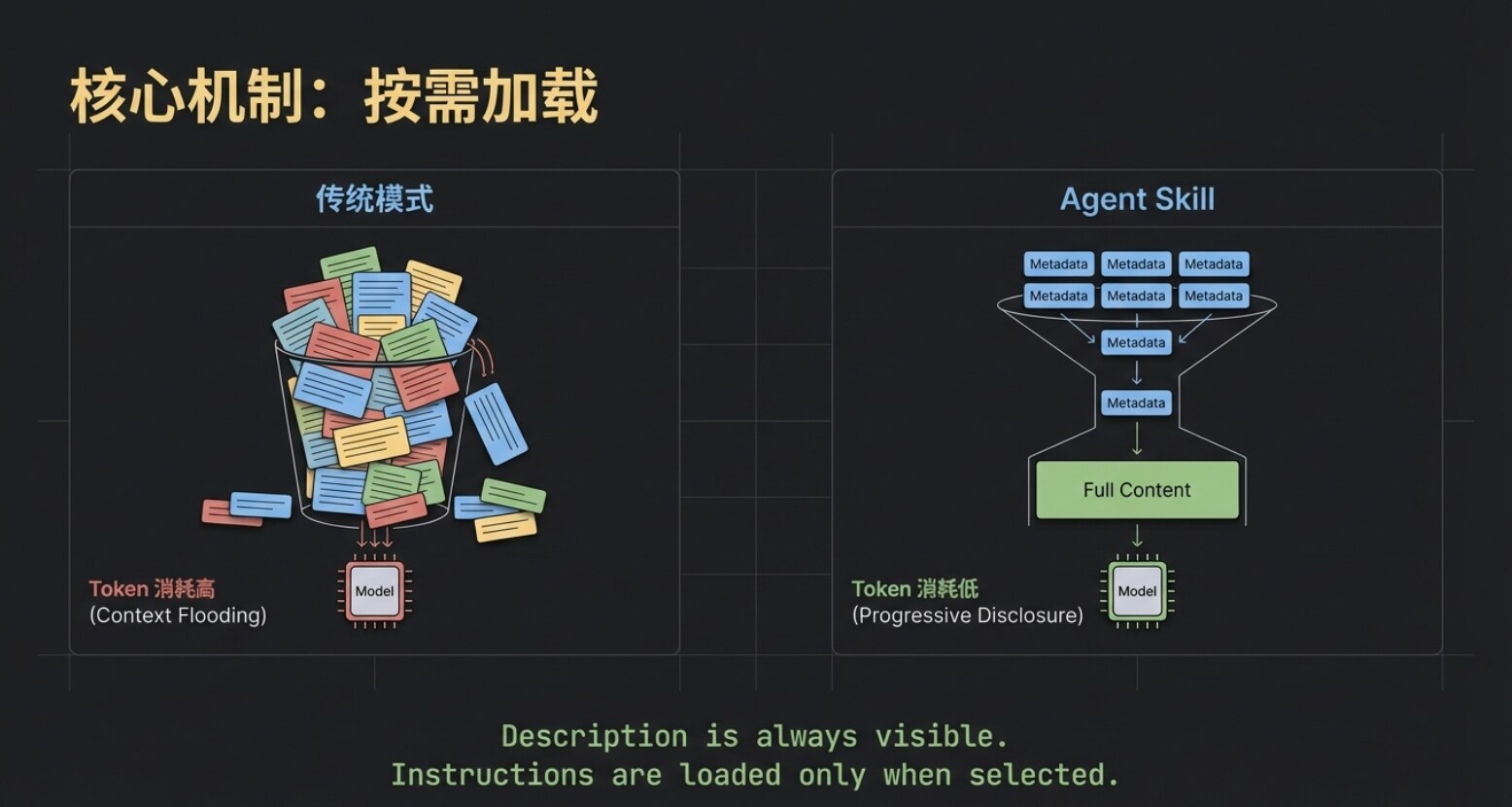
Although the names and descriptions of all Skills are always visible to the large model, the specific instruction content is only truly pulled into the model's context after that Skill is precisely matched.
This greatly saves precious Token resources. Imagine that even if you simultaneously deploy a dozen large-scale Skills like "Viral Copywriting," "Meeting Summary," and "On-Chain Data Analysis," the model initially only needs to perform an extremely low-cost "directory search." Only after selecting the target does the system feed the corresponding skill.md to the model. This "on-demand loading" is the first layer of the secret to Agent Skill's lightness and efficiency.
However, for advanced users pursuing ultimate efficiency, just achieving this first layer of on-demand loading is not enough.
As business deepens, we often want Skills to become smarter. Taking the "Meeting Summary Assistant" as an example, we hope it can not only simply recount topics but also provide incremental insightful value: When a meeting decision involves spending money, it can directly mark in the summary whether it complies with the group's financial regulations; when involving external cooperation, it can automatically flag potential legal risks. This way, when the team reviews the summary, they can immediately spot key compliance warnings, avoiding the hassle of secondary checks against regulations.
But this creates a fatal engineering contradiction: For a Skill to possess such capabilities, it must first stuff the lengthy "Financial Regulations" and "Legal Provisions" entirely into the skill.md file. This would cause the core instruction file to become extremely bloated. Even if today's meeting is purely a technical morning stand-up, the model is forced to load tens of thousands of words of financial and legal "nonsense," which not only causes severe Token waste but also easily triggers the model's "attention dispersion."
So, can we achieve another layer of "on-demand within on-demand" on top of the basic on-demand loading? For example, only when the meeting content genuinely discusses "money" does the system pull out the financial regulations for the model to see?
The answer is yes. The Reference mechanism within the Agent Skill system is precisely designed for this.
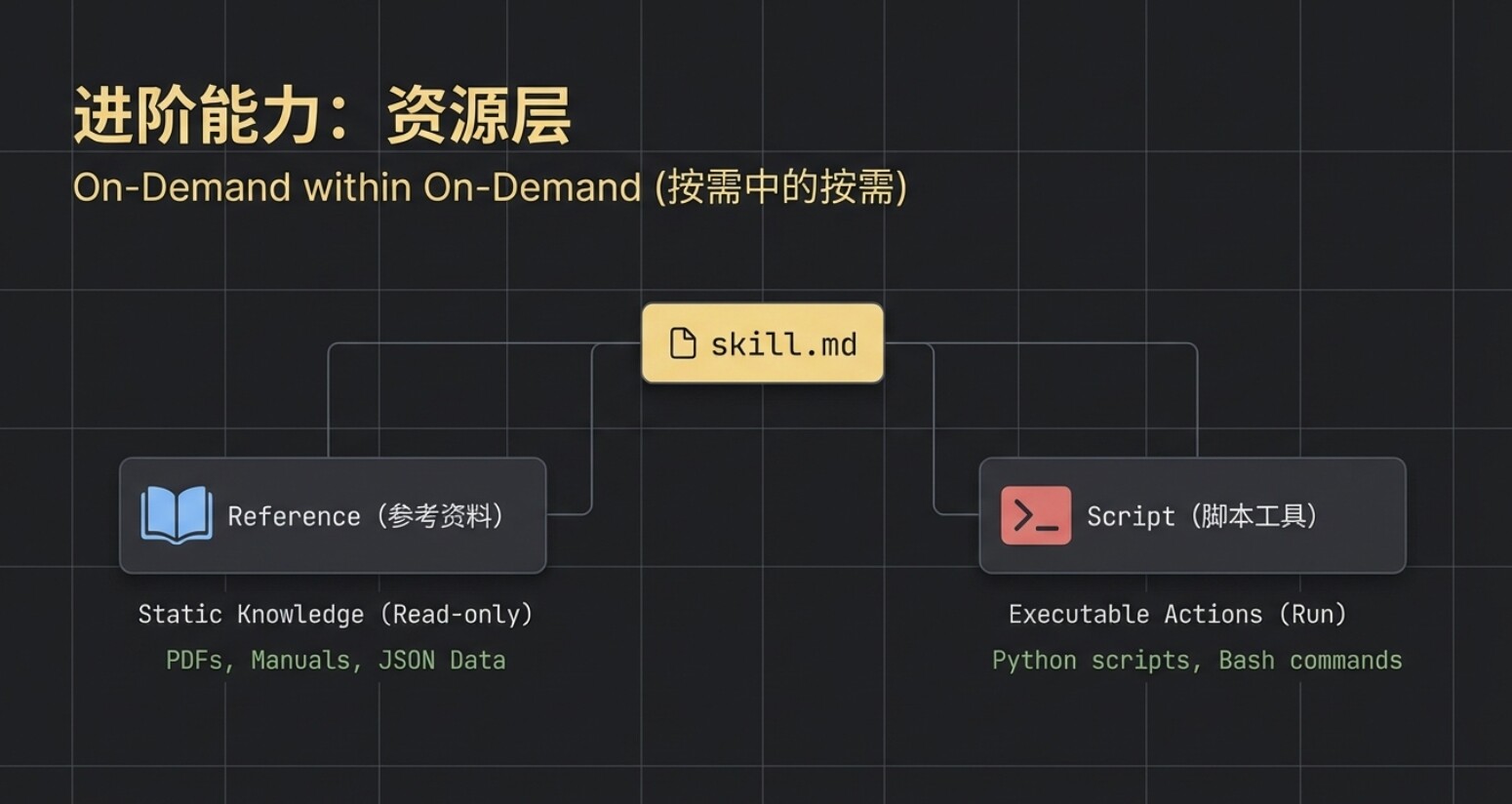
The essence of Reference is a conditionally triggered external knowledge base. Let's see how it elegantly solves the above pain points:
- Establish External Reference File: First, we add an independent file under the Skill's directory, which is the Reference in terminology. Let's name it
Group_Financial_Handbook.md, detailing various reimbursement standards (e.g., accommodation subsidy 500 yuan/night, meal allowance 300 yuan/person/day, etc.). - Set Trigger Conditions: Next, return to the core
skill.mdfile and add a dedicated "Financial Reminder Rule." We can explicitly stipulate in natural language: "Trigger only when meeting content mentions words like money, budget, procurement, expense, etc. Upon triggering, read theGroup_Financial_Handbook.mdfile. Based on its content, indicate whether the amounts in meeting decisions exceed standards and specify the corresponding approver."
After completing the setup, when we review budget allocation in the next meeting, a sophisticated dynamic collaboration begins:
- The client tool scans and requests your permission to use the "Meeting Summary Assistant" Skill (completing the first layer of on-demand loading).
- The model, while reading the meeting minutes, keenly detects words related to "budget," immediately triggering the rule we embedded in
skill.md. - At this point, the system initiates a second request to you: "Allow reading
Group_Financial_Handbook.md?" (completing the second layer of on-demand loading: dynamic Reference triggering). - After authorization, the model cross-references the meeting content with the dynamically introduced financial standards, ultimately outputting a high-quality summary that not only contains "attendees, topics, decisions" but also carries a "financial compliance warning."
Please remember the core characteristic of Reference: It is strictly condition-constrained. Conversely, if today's meeting is a technical review discussing code logic, completely unrelated to money, then this Group_Financial_Handbook.md will lie quietly on the hard drive, not consuming even a single Token of computing resources.
5. Script and Progressive Disclosure Mechanism
Having covered the Reference mechanism that solves information overload, let's now move to another killer capability of Agent Skill: Code Execution (Script).
For a mature Agent, merely being able to "look up information" and "write summaries" is not enough; being able to directly get the job done is the true automation loop. This is where Script comes into play.
Continuing with our "Meeting Summary Assistant" example. After the summary is written, it usually needs to be synced to the company's internal system. To achieve this final step, we create a new Python script in the Skill's folder, named upload.py, containing the upload logic for connecting to the company server.
Next, we return to the core skill.md file and append an explicit instruction: "When the user mentions words like 'upload,' 'sync,' or 'send to server,' you must run the upload.py script to push the generated summary content to the server."
When you tell the AI: "The summary is well written, help me sync it to the server."
The client tool will immediately request your permission to execute this upload.py