




11 steps for contract novice to make a professional trading plan


A trading plan is a checklist, which can help us better execute the established transactions and be more principled. If there is no plan, it is easy for us to leave the market early in the repeated price fluctuations and fail to earn the money we should have. Stop losses and lead to burst losses and other problems.
How to make a complete professional trading plan? There are usually the following 11 steps: determine the trading product -> entry cycle -> transaction direction -> entry price -> entry method -> stop loss price -> position -> first target price -> second target price - > Reason -> Result Presentation
The first step is to determine the trading variety. There are many varieties available for trading in the financial market. Each variety has different characteristics, depth, and rules. The same strategy may not be suitable for every variety. Each complete trading plan corresponds to a variety, and the general priority principle is: familiarity > market value > sector
① Choose a large market capitalization website: CoinMarketCap
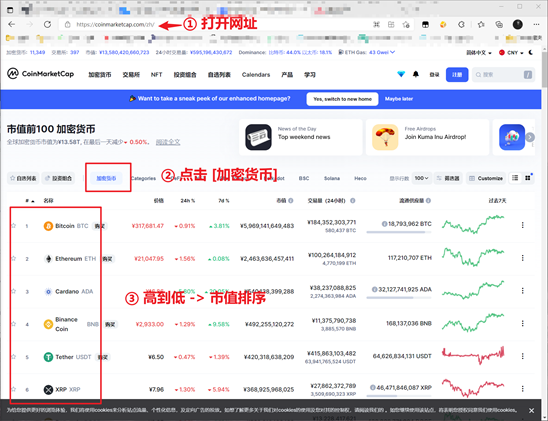
② View popular sector websites: AICoin
③ Record l Open Notepad or any software that can record text, the following uses the TradingView blank area as an example l Input format: "trading symbol: XXX"
The second step is to determine the entry cycle. The entry cycle is the cycle of placing an order. Usually, the trading cycle is divided into 4 hours, 1 hour, 30 minutes, 15 minutes, and 5 minutes from large to small. After confirming, open it in the chart Corresponding cycle diagram (Take TradingView as an example, referred to as TV) 1. Open TV: https://cn.tradingview.com/2. Click the time frame
3. Select the corresponding time period
4. Record
The third step is to determine the trading direction 1. Taking long as an example, open Notepad or any software that can record text, and use the blank area of TradingView as an example to enter the format: "Direction: long"
The fourth step is to mark the entry price. The entry price (entry price) is the actual point where the transaction order enters the market. 1. Open the trading software and enter the cycle chart (take 1 hour as an example)
2. Click the 'horizontal line' tool
3. Click on the blank area near the entry price
4. Double-click to set the specific price
5. Open Notepad or any software that can record text, and use the blank area of TradingView as an example to enter the format: "Admission: $48000"
The fifth step is to determine the entry method. There are three common entry methods, namely, entry by pending order, entry by breakthrough, and entry by confirmation. Immediate transaction l Breakthrough entry: For example, when the price moves from bottom to top to change the price, the order will be filled immediately at the market price l Confirm entry: When the price reaches this price, wait for the trading signal Let us use a pending order to enter the market as an example , RT, I placed a 46,000 buy and long transaction order in BTC. The entry method is a pending order entry. When the price drops from 48,000 to 46,000, my order will be completed. After confirming the entry method, this step is Completed 1. Open Notepad or any software that can record text, take the blank area of TradingView as an example to enter the format: "Entry method: pending order entry"
The sixth step is to mark the stop loss 1. Click the 'horizontal line' tool
2. Click near the stop loss price
3. Double-click to set the specific price
4. Record
The seventh step is to calculate the position 1. Stop loss space = | entry price - stop loss price | The entry price is 48000, the stop loss price is 46000, then the stop loss space is the difference between the two to take the absolute value, 48000-46000=20002, Single risk "Single risk" refers to "when the transaction is stopped, what is the loss value?" Usually Nuohai recommends that this value account for 2% of the total funds. Assuming a total fund of 10,000 USDT, 2% It is 200U, so when you make a wrong transaction and trigger the stop loss, you will only lose 200U, accounting for only 2% of the total funds, which is a fund management method with small risks and high returns. In this example, we assume that the principal is 10,000 USDT, 2% single risk is 200U, so the single risk value here is 2003, position = single risk / stop loss space position = 200 / 2000 = 0.1, the unit here is currency, which is 0.1 BTC4, record
Step 8 Mark the first target price (TP1) TP1 is the first target price, that is, the first take-profit level. In this example, we make the first take-profit at 50,000. 1. Click the 'horizontal line' tool
2. Click near 50000
3. Double-click to set the specific price
4. Record
Step 9 Mark the second target price (TP2) Same as the previous step, set TP2 60000
The tenth step is to record the reason for entering the market. The reason for entering the market is a basis for making orders. Every transaction must have a clear reason and record it, so that we can go back and analyze it.
The eleventh step presents the results So far, one of our trading plans has been completely generated, as shown in the figure below