






Getting Claude to Actually Work for You: A System Configuration Guide


- Core Viewpoint: This article systematically outlines Claude's product evolution in 2026, emphasizing its transformation from a conversational tool into a deeply integrable work system. The key difference lies in how users maximize its effectiveness by building context, selecting usage modes, and leveraging extension mechanisms.
- Key Elements:
- Model Tiers and Capabilities: The Claude 4.6 series offers three model tiers: Opus (high performance), Sonnet (balanced), and Haiku (low cost), all supporting a 1 million token context window with no long-context premium.
- Four Core Usage Modes: Including Chat (quick dialogue), Cowork (desktop Agent task delegation), Code (terminal development), and Projects (persistent workspace), optimized for different scenarios.
- Cowork Environment Setup: Knowledge workers need to transform AI from a tool into an autonomous workflow by building workspace folders, a context file system (e.g., about-me.md), setting global instructions, and utilizing the AskUserQuestion function.
- Claude Code Extension System: Developers can build a reusable, collaborative development platform through project instructions like CLAUDE.md, a Rules directory, Commands/Skills/Agents mechanisms, and the MCP protocol, enabling automated code reviews and team collaboration.
- Ecosystem Integration and Automation: Claude connects to external tools (like Google Drive, Slack) via Connectors, supports Scheduled Tasks and Dispatch for cross-device control, and integrates into office software such as Excel and PowerPoint, enabling end-to-end automation.
- Enterprise Capabilities and Market Impact: Anthropic has completed significant funding rounds, with rapid growth in enterprise revenue. The launch of a certification system and enterprise analytics API indicates Claude is becoming a key component of enterprise infrastructure.
Original Title: everything claude has shipped in 2026 and how to actually use it
Original Author: @kloss_xyz
Original Compilation: Peggy, BlockBeats
Editor's Note: When we look back at Claude's product evolution in 2026, a clear shift emerges: the question is no longer "What can it do?" but rather "How should different people use it?"
This article provides a systematic overview of Claude's capabilities and usage patterns based on Anthropic's product updates since 2026. It is organized around the logic of "what different people should use, in what scenarios, and how." You can think of it as a navigation guide: when faced with a specific task, you can quickly locate the corresponding module and invoke the appropriate capabilities.
For first-time Claude users, the first step is to understand the models and foundational capabilities, including context window, model tiers, and the four usage modes. These factors collectively define Claude's capability boundaries and form the basis for subsequent usage patterns.
For knowledge workers, the focus lies on the task execution system represented by Cowork. How you set up your workspace, build context files, configure global instructions, and restructure interactions through AskUserQuestion determines whether you are "using AI" or "having AI work for you."
For developers, the core path unfolds through Claude Code. The key is no longer writing code itself, but how to build a reusable, collaborative development system through mechanisms like CLAUDE.md, Rules, Commands, Skills, and Agents, making Claude an integral part of the software production workflow.
At a more specific application level, from data analysis and presentations in Excel and PowerPoint to APIs, automation workflows, and visualization capabilities, Claude is gradually embedding itself into traditional software systems, becoming a component of the underlying capabilities.
As AI transitions from a "conversational tool" to a "work system," the real difference no longer stems from the model itself, but from how you use it.
The following is the original text:
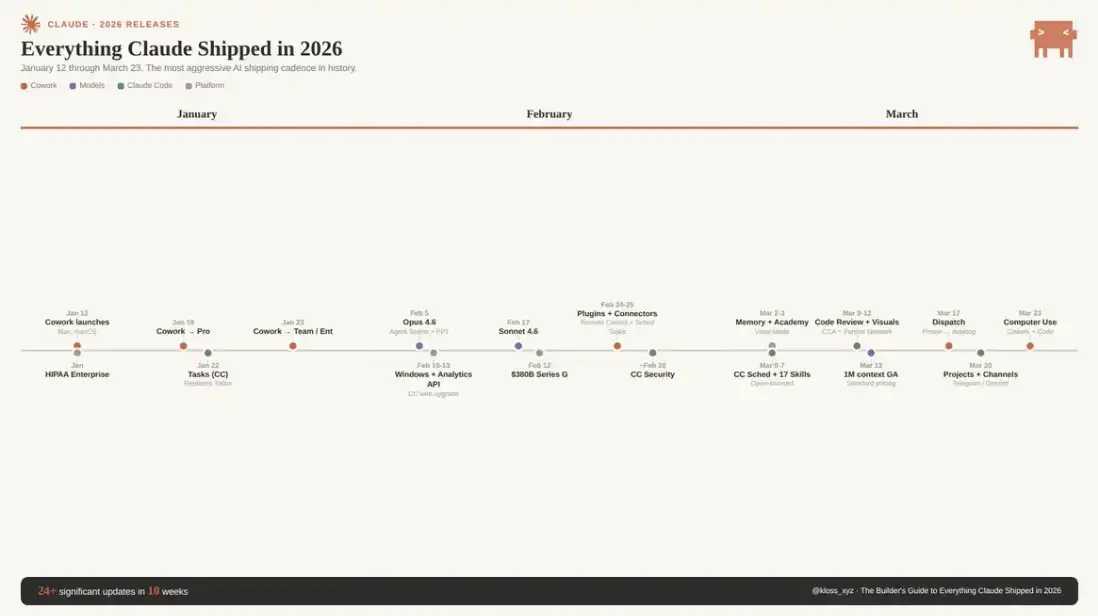
Anthropic's recent product update pace has become absurdly fast, making it difficult even for many power users to keep up. New versions are released almost daily, and since January this year, the frequency of major version updates has stabilized at roughly every two weeks. New models, new tools, new integrations, even entirely new product categories are constantly being launched. If you blink or take a few weeks off, you've likely missed several key changes. And Claude is genuinely reshaping how you work—there's no doubt about that.
This is a "panoramic guide." As of March 23, 2026, it covers all major features that have been launched on Claude: including how to set up each feature, in what scenarios to use it, and truly effective best practices. Mastering these distinctions is the key difference between "thinking it's cool" and "genuinely restructuring your workflow."
You'll likely want to bookmark this content and refer back to it. You can also share it with your team or friends. This is precisely the reference manual I wish someone had compiled when I was getting started.
Models & Foundational Capabilities: What Claude "Can Do"
The Claude 4.6 series is currently divided into three model tiers. Below are the capability boundaries and suitable scenarios for each model:
Claude Opus 4.6 is the current performance ceiling. Released on February 5, 2026, it supports a 1 million token context window (price adjustments detailed later). With a 1 million token long context, it scores 78.3% on MRCR v2, the highest among current peer models.
It leads comprehensively in tasks like law, finance, and programming. Anthropic reports its task persistence capability can reach 14.5 hours, the longest among frontier models. API pricing is $5 per million tokens input / $25 output, with a maximum output of 128K tokens. It supports adaptive reasoning and adds a "max" level for unleashing peak capabilities.
Note: MRCR v2 score is a metric for the model's ability to "find the right information in ultra-long contexts."
· Suitable Scenarios (Opus): Complex large-scale context analysis, codebase refactoring, deep research, high-stakes deliverables, serious content production, and any task where "quality takes precedence over cost."
· Unsuitable Scenarios (Opus): Any workflow requiring high-frequency calls. At current prices, a heavy Opus usage scenario could cost $50–100 per day. Sonnet should be the default priority, upgrading to Opus only when Sonnet's output quality is insufficient.
Claude Sonnet 4.6 was released on February 17, just 12 days after Opus, and is the default choice for most users. It also supports a 1 million token context (officially available from March 13). It shows improvements in coding, computer use, long-context reasoning, Agent planning, knowledge work, and design. In early testing, about 70% of users preferred Sonnet 4.6 (compared to 4.5), and it even outperformed the previous flagship Opus 4.5 in 59% of scenarios.
It serves as the default model for Free and Pro users on claude.ai. API pricing is $3 / $15 per million tokens, with a maximum output of 64K tokens, and is about 30–50% faster than 4.5.
· Suitable Scenarios (Sonnet): Daily work, quick drafts, routine programming tasks, Agent workflows—striking a balance between speed and intelligence. In many office scenarios, its performance is already close to or even surpasses Opus (leading in some tasks in Anthropic's OfficeQA benchmark), while costing about 40% less.
Claude Haiku 4.5 is a low-cost, ultra-fast model for high-concurrency scenarios, primarily used in API pipelines or subagent tasks, such as read-only processing work.
However, there's a crucial caveat: Haiku completely lacks prompt injection protection. If you use it to process untrusted inputs in an Agent system, you must carefully assess the risks and read the official documentation thoroughly.
1 Million Context Window: Changes in Pricing Structure
Previously, requests exceeding 200K tokens required a premium (Opus price could reach $10 / $37.5 per million tokens). But starting March 13, this premium has been completely eliminated. Now, 900K tokens and 9K tokens cost exactly the same per unit. No multipliers, no hidden conditions, and no beta header required.
What does this mean? Approximately 750,000 words of context capacity can be loaded at once: an entire codebase, a complete legal contract, a large dataset, months of documentation records, all kept within the same "working memory."
Simultaneously, multimodal capabilities have been enhanced, supporting up to 600 images or PDF pages per request (previously 100, a 6x increase). Currently available on Claude Platform, Microsoft Foundry, and Google Cloud Vertex AI.
For teams, the change is very direct: content that previously required chunking, summarization pipelines, and rolling context management can now be loaded directly. Some companies even report that increasing context from 200K to 500K actually reduced total token consumption because the model no longer repeatedly reads and reprocesses historical information.
Claude's Four Usage Modes: When to Use Which
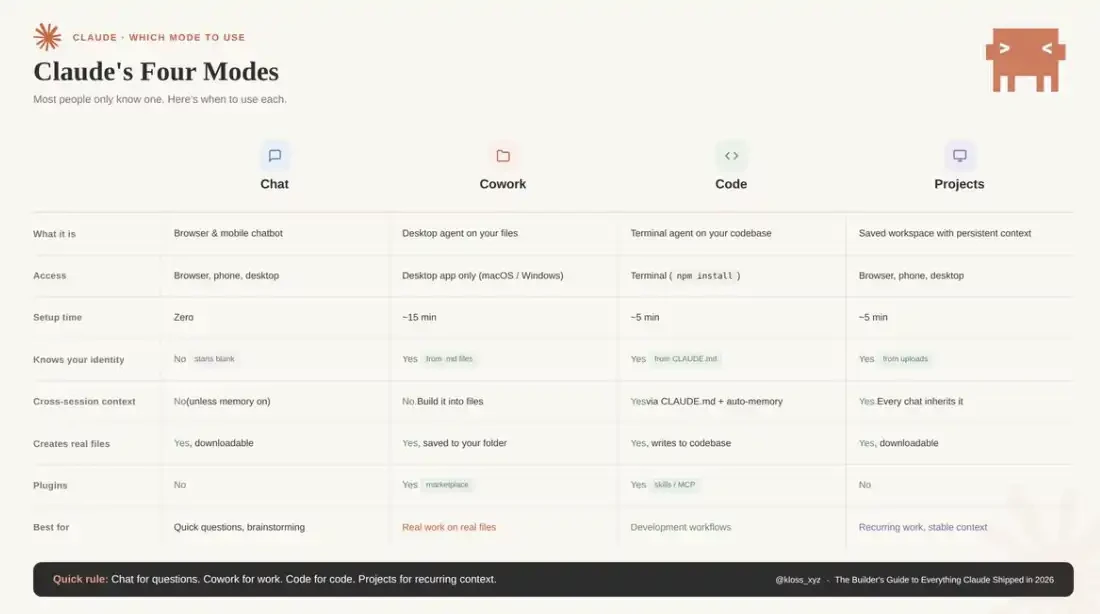
Claude offers four modes, but most people have only used one:
Chat
The browser/mobile interface you're most familiar with. Suitable for asking questions, brainstorming, writing drafts.
Each conversation starts from scratch; you're always leading the process.
Cowork
Desktop Agent. Can directly read and modify your local files, automatically execute multi-step tasks, and output completed results to your folders.
Suitable for "handing off the task," not back-and-forth dialogue.
Code
Developer mode, runs in the terminal. Can access codebases, write code, execute commands, manage Git.
If you write code, this is where the leverage is highest.
Projects
Persistent workspace. You upload files and instructions once, and every new conversation automatically carries the full context.
Ideal for repetitive work, like weekly reports, newsletters, client deliverables, etc.
A simple rule of thumb: Chat for quick questions, Cowork to let AI do the work for you, Code for development tasks, Projects for repetitive work with stable context.
Memory and Personalization
As of March 2, 2026, Claude has rolled out memory functionality based on chat history to all users (including free users). Claude extracts relevant context from your conversations and generates a memory summary usable across sessions. You can view, edit, or delete these memories in Settings > Capabilities. It also supports importing and exporting complete memory data—convenient for backups before adjustments or migrating to a new account. If you start an Incognito conversation, the corresponding content won't be written to memory.
The key action here is: Go to Settings > Memory right now and see what Claude has already "remembered." Correct inaccurate or outdated information and add background it should know. The more accurate your memory, the less you'll need to repeatedly explain yourself in future sessions.
Note that memory is not inherited between Cowork mode sessions. If you need persistent context, you'll need to compensate with "context files" (detailed in the Limitations section below).
How to Master Cowork: For Knowledge Workers
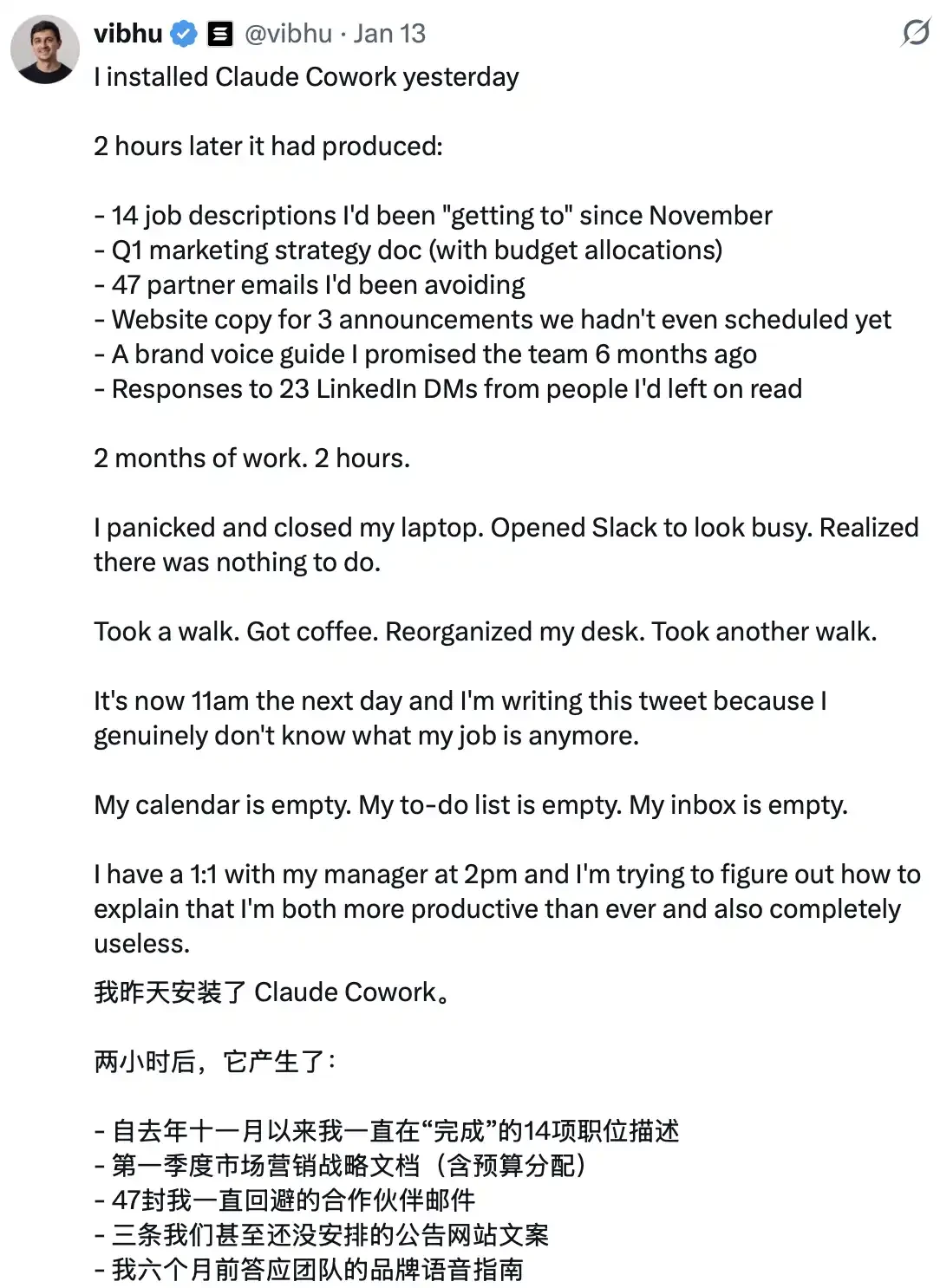
Cowork has arguably changed the game completely. It launched as a research preview on macOS on January 12 (for Claude Max users), expanded to Pro users on January 16, to Team and Enterprise on January 23, and later a Windows version was released. The market reaction was very direct—investors quickly realized what this meant, with SaaS company market caps evaporating hundreds of billions of dollars in just a few days; Wall Street understood the trajectory.
But the key is: Stop thinking of it as a chat interface.
Cowork's essence is task delegation.
You just describe "what the completed result looks like," and Claude automatically formulates a plan, breaks down subtasks, autonomously executes them in your real computer environment, and delivers the final completed files to your folder. You can literally walk away and return to find the work done.
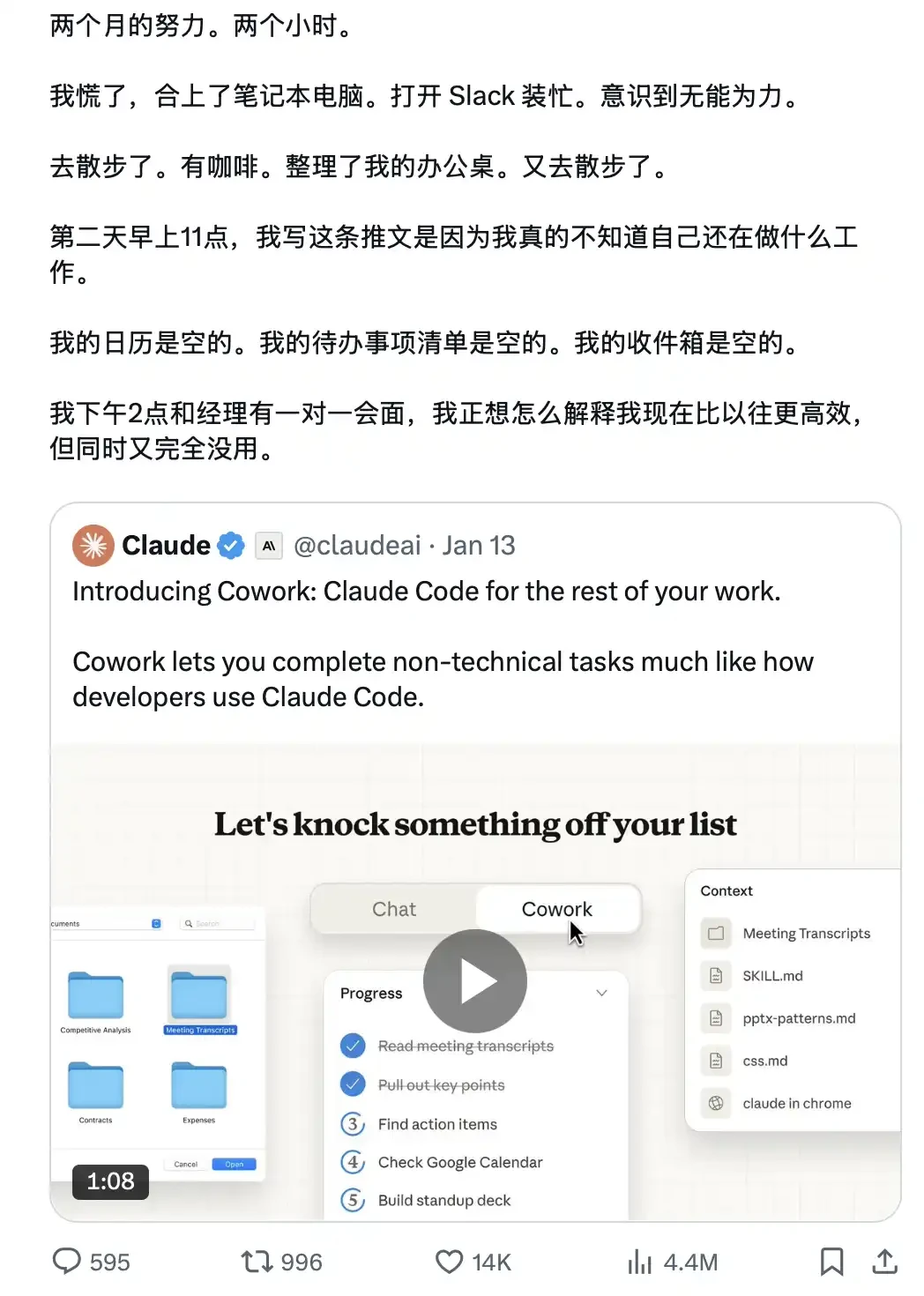
Anthropic built Cowork using only Claude Code in about 10 days.
Four-Step Environment Setup: Configuring Your Cowork Workflow from Scratch
Those who don't use Cowork well often stick to old habits: writing long, detailed prompts for each task, resulting in unstable outcomes.
Those who truly understand it do something else: Spend an afternoon setting up the "context environment" (including context files, global instructions, folder structure), and then produce results directly deliverable to clients with just a 10-word prompt.
The logic behind this is:
ChatGPT trains you to write better prompts.
Cowork rewards you for building a better "file system."
The former is a skill that depreciates as models evolve; the latter is a capability that compounds over time.
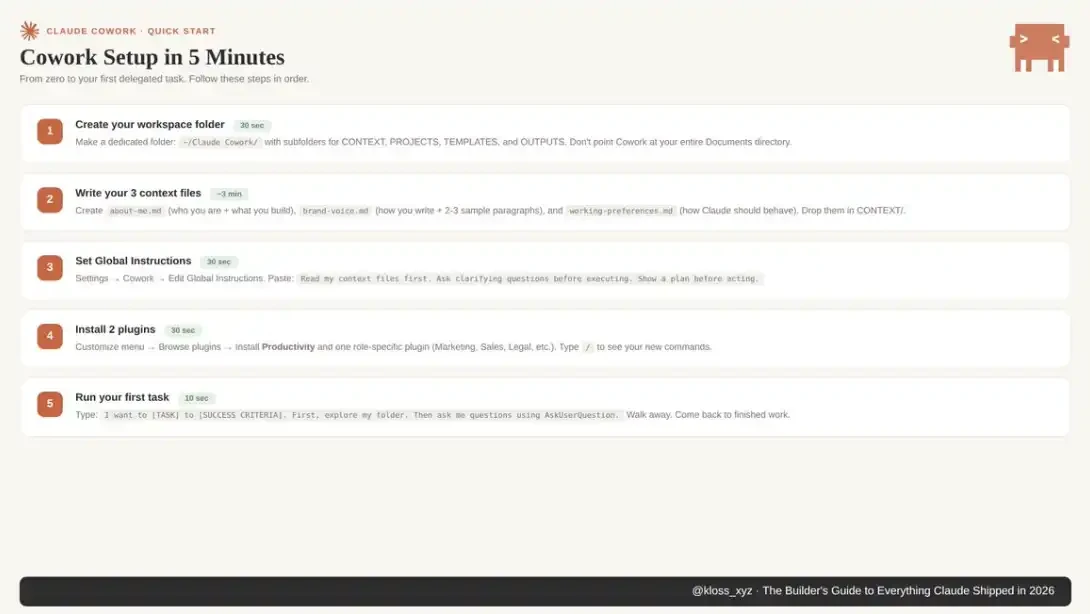
Step 1: Set Up Your Workspace Folder
Create a dedicated folder on your computer for Cowork.
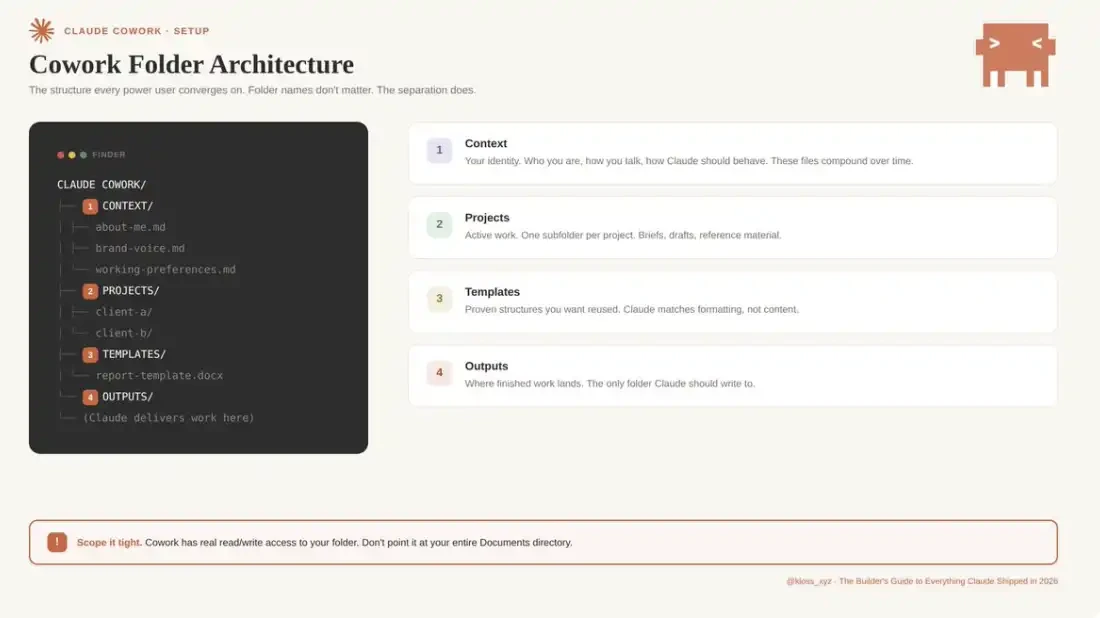
Don't point it directly at your entire Documents directory. If something goes wrong (it can happen), you need to limit the scope. Because Cowork has real read/write permissions to the folders you authorize.
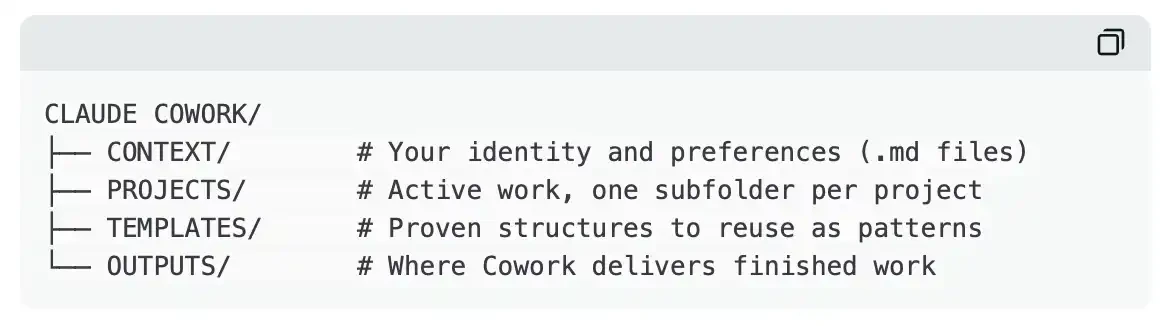
This maintains clear structure and limits Claude's accessible range. Almost all power user practices eventually converge to a similar foundational structure. The folder name isn't important; the key is proper layering and isolation.
Step 2: Build Your Context File System
This is the key step to solving "AI output homogenization." In your CONTEXT folder, create three Markdown files:
about-me.md
Defines your role and current work focus. This isn't a resume, but the work you're actually involved in daily, who you serve, current priorities, which items hold the most business value. Also add one or two representative achievements as references for capability and standards.
brand-voice.md
Solidifies your expression style. Includes tone characteristics, commonly used and prohibited vocabulary, formatting preferences, and 2–3 real writing samples. This is the core dividing line between "generic AI content" and "output with personal style."
working-preferences.md
Clarifies Claude's execution norms. For example: ask clarifying questions before execution, output task breakdown first, don't perform deletions without confirmation, default output format, quality standards, and behaviors to avoid.
These three files solve the "cold start" problem in a short time: without context, each task requires starting from scratch; after configuration, Claude begins each session with a complete understanding of your style, standards, and preferences.
A key, often overlooked point is that these context files have "compound interest." It's recommended to iterate and optimize them weekly. When Claude's output doesn't meet expectations, prioritize determining: Is this a prompt problem or a context problem? In the vast majority of cases, the problem originates from context. The solution is straightforward: add a rule to the corresponding file, creating a long-term effective correction mechanism.
From practice, the setup cost for this system is extremely low: I spent about 45 minutes building the initial context folder—three .md files defining "who I am," "what I do," and "how Claude should execute." Based on this, the next time, with just a 10-word project brief prompt, the output met the expected standard on the first generation. Before this, every task required re-explaining the complete work background and requirements from scratch.
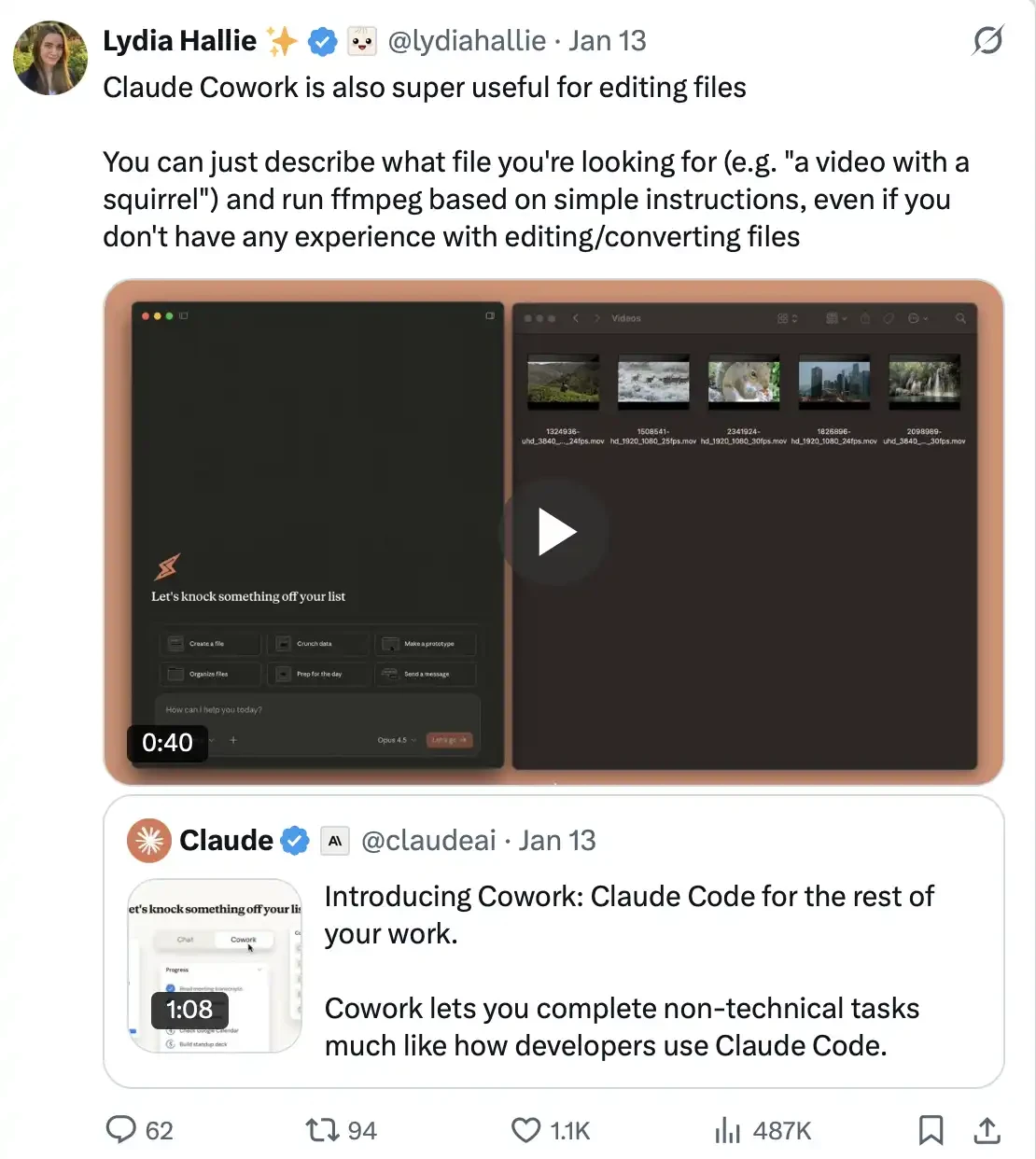
A user noted: "Claude Cowork is also very useful for file handling and editing. You just describe the file you're looking for in natural language (e.g., 'a video with a squirrel'), then give simple operation instructions, and Claude can call ffmpeg to complete the processing. Even if you have no experience with file editing or format conversion, you can successfully complete related operations."
Step 3: Set Global Instructions
Go to Settings > Cowork > Edit Global Instructions.
Global instructions load before everything else—before your files, before your prompt, even before Claude reads your folders. They define the "underlying behavioral norms" followed in every session.
Here's a template to start with:
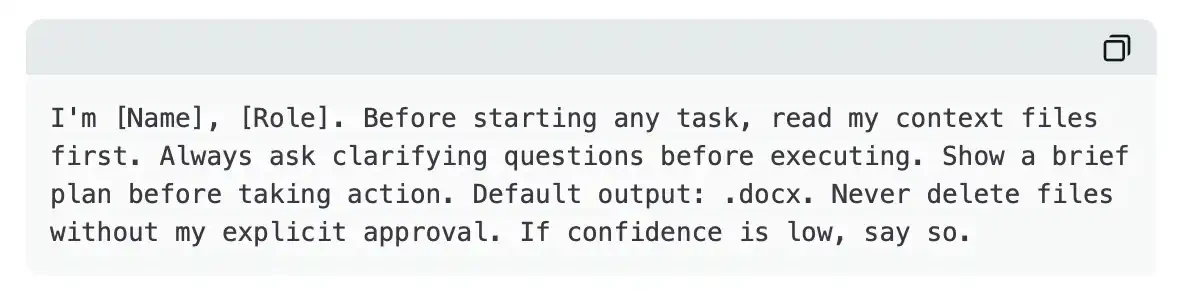
This means even the most casual, rushed prompts can produce calibrated results. Claude always knows who you are, always prioritizes reading the correct files, always confirms before making judgments. The prompt itself only needs to handle the specific task at hand.
Step 4: Learn to Use AskUserQuestion
This feature fundamentally changes the entire interaction. Instead of you designing the "perfect prompt," Claude designs the "perfect questions." When you add "Start by using AskUserQuestion" to any prompt, Cowork automatically generates an interactive form: including multiple-choice questions, clickable options, clear alternative paths, and a structured question framework to help clarify real needs before execution.
The result is you no longer need to write long, meticulously designed prompts from scratch; instead, let Claude actively determine what information it needs. If the first round of questions still doesn't align with needs, you can directly point out the issue, and it will generate a new round, iterating continuously.
A universal prompt template applicable to almost all scenarios:
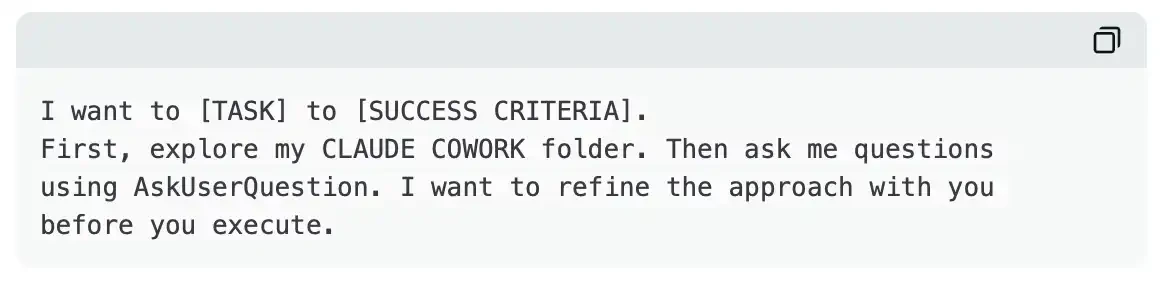
It's that simple. This template, plus your context file system, can basically cover 80% of usage scenarios. The workflow remains consistent; only the context itself changes.
Cowork Core Features
Connectors
Launch Date: February 24.
Claude Cowork now supports connecting to various tools like Google Drive, Gmail, DocuSign, FactSet, Google Calendar, Slack


