






OpenClaw Minimalist Deployment: Get It Done in as Little as 1 Minute, a Beginner-Friendly Tutorial


- Core Viewpoint: The article provides a horizontal comparison of six mainstream deployment solutions for OpenClaw, aiming to help users with different technical backgrounds and budgets choose the most suitable method for themselves, thereby lowering the deployment barrier and enabling them to own an AI assistant.
- Key Elements:
- Top Choice for Beginners: Sahara Claw App (official desktop version) and SimpleClaw (fully managed SaaS) are the easiest to install. The former is free and supports Sorin encrypted data analysis, while the latter is paid but offers 7x24 managed hosting services.
- Cost-Effective and Stable Options: Self-built cloud server solutions like Tencent Cloud and Alibaba Cloud offer full server control, stable uptime, and excellent network performance, starting at around 40 RMB per month. They are suitable for users who value control and cost-effectiveness.
- Solutions for Tech-Savvy Users and Cost Control: Google Cloud can be used for short-term zero-cost deployment by utilizing new user credits; utilizing idle computers for local deployment offers extremely low costs and the highest system permissions, but comes with a higher technical barrier and potential security risks.
- Security and Privacy Considerations: Official applications and mainstream cloud provider solutions offer higher security; third-party hosting services carry trust and privacy risks; local command-line deployment provides the strongest data privacy but requires guarding against system-level operation risks caused by model hallucinations.
- Differences in Feature Completeness: Managed solutions offer standard but closed functionality; self-built cloud servers have the strongest extensibility; local deployment solutions offer the highest functional ceiling, allowing for deep integration and automation of operating system-level tasks.
Original Author: Biteye Core Contributor Denise
Original Editor: Biteye Core Contributor Denise
Deploying OpenClaw is often a hurdle for beginners. Whether it's the obscure code on GitHub or the error-filled terminal interface, many are discouraged.
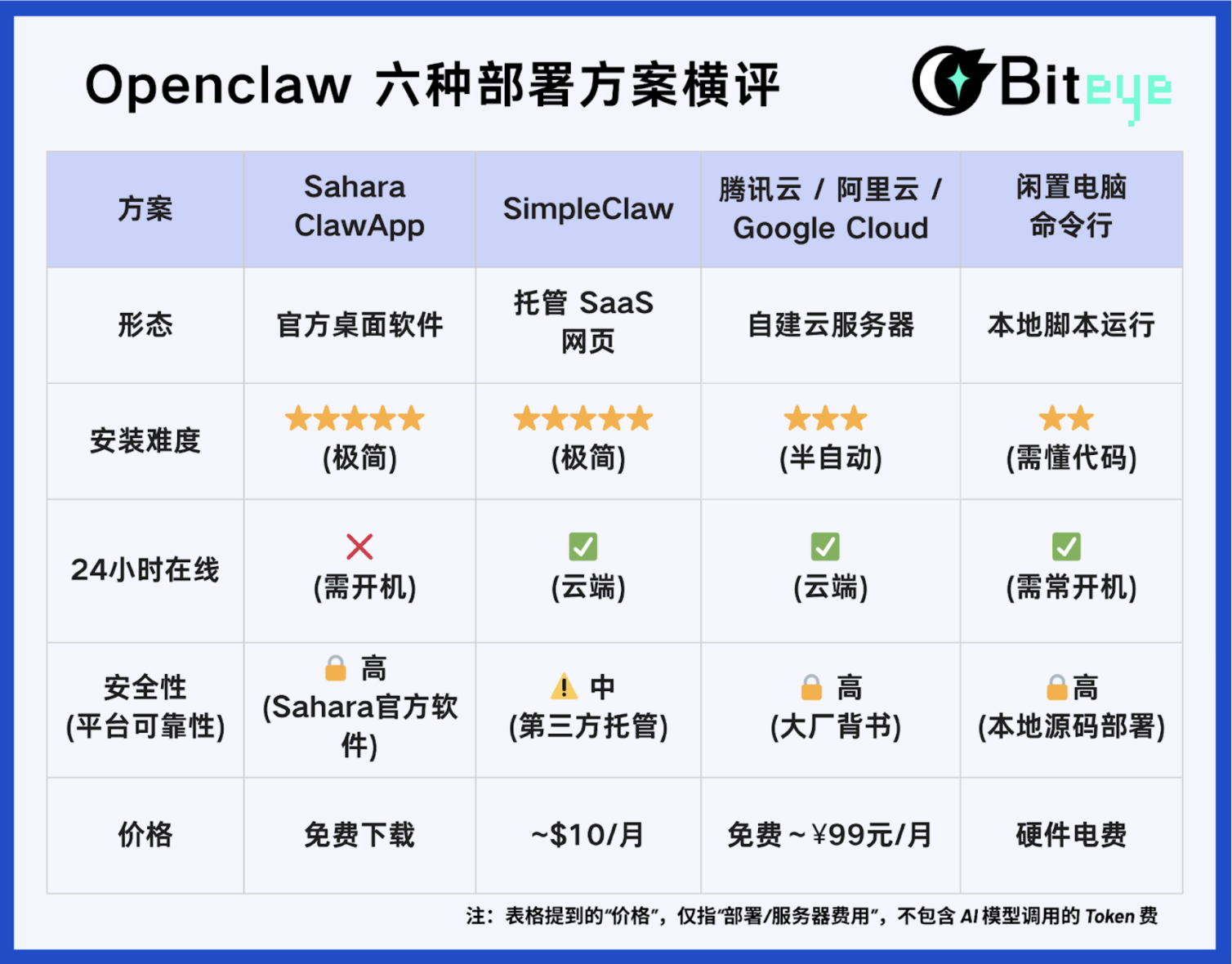
To help everyone break through the technical barriers and successfully own their own AI employee, Biteye has summarized the 6 mainstream deployment solutions on the market, conducting a cross-evaluation from four dimensions: installation ease, feature completeness, price cost, and security. Please choose the one that fits your "wallet thickness" and "hands-on ability".
TL;DR: Core Parameter Comparison
Tier 1: Official & Hosted (Beginner's Choice, Easy as Pie)
If code gives you a headache, or you don't want to deal with any server operations, the solutions in this tier are for you.
1. Sahara Claw App — Mac Desktop Version
Positioning: The "official favorite son" installed on your local computer, not a cloud host.
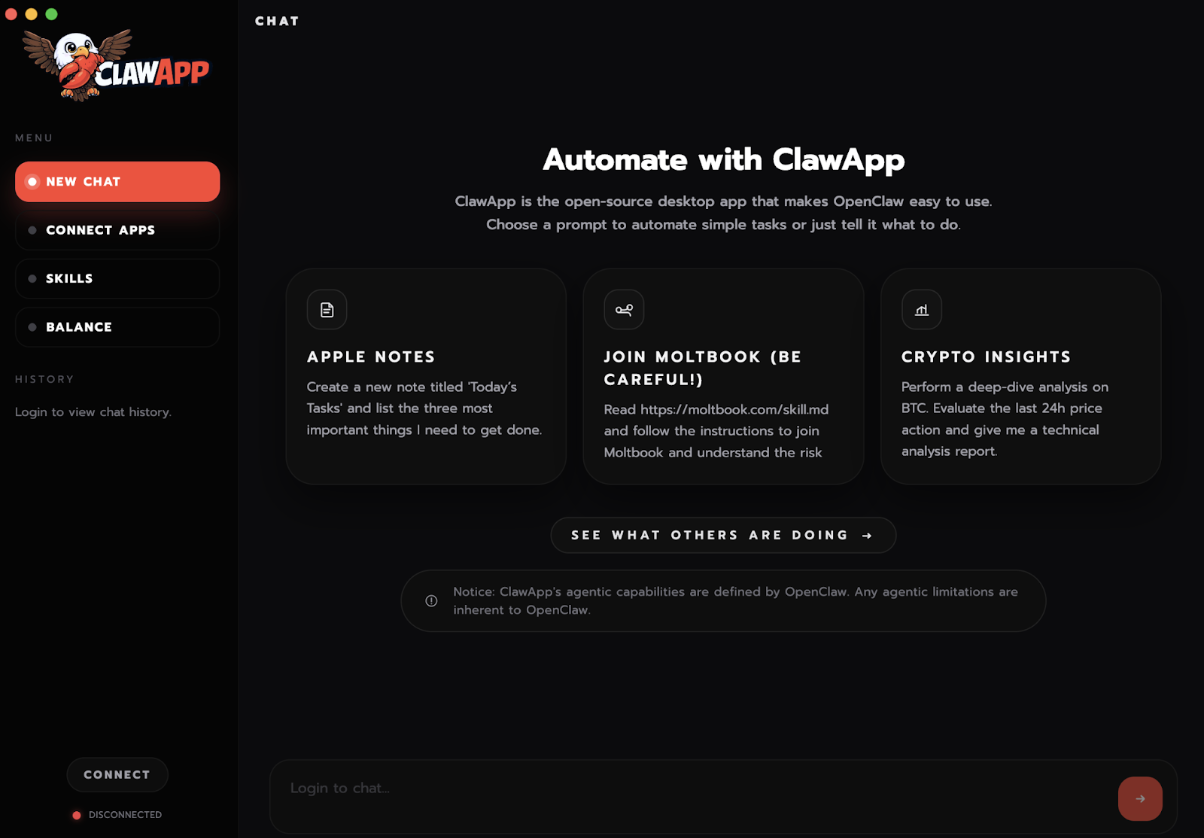
This is the official open-source desktop application just released by Sahara AI. Its emergence is a dimensional blow to all "deployment-for-hire" services on the market. Its essence is a client software that runs on your computer like WeChat.
Installation Ease: ⭐⭐⭐⭐⭐
- Zero technical threshold: No Docker, no command line. Download the installer -> Double-click to run -> Log in.
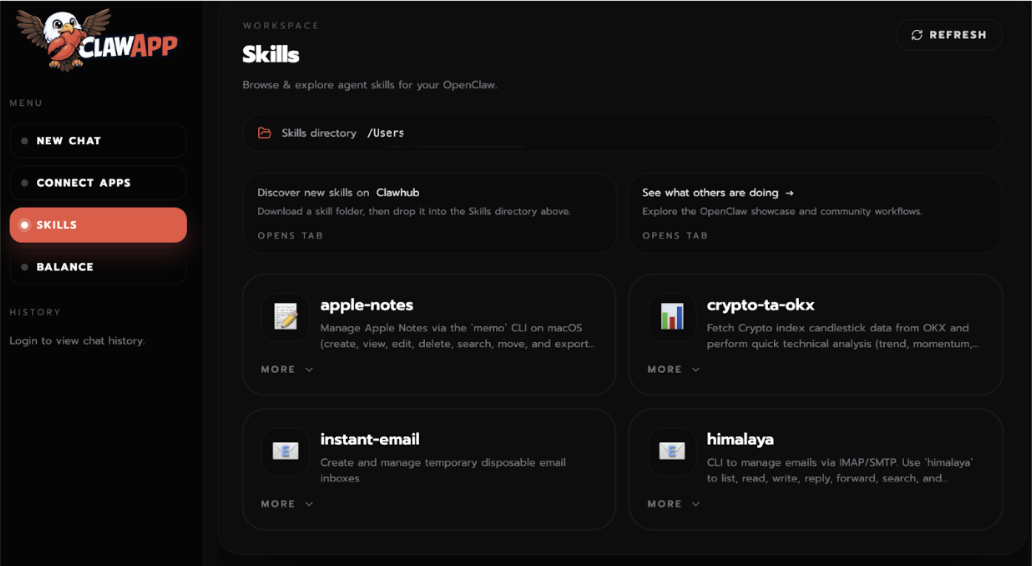
- Visual interaction: The official provides an extremely clear guided interface, supporting one-click connections to communication platforms like Telegram and Moltbook, and one-click installation of skills.
Feature Completeness: ⭐⭐⭐⭐
- Exclusive crypto data: This is currently the only solution that natively supports Sorin encrypted data intelligence, allowing direct analysis of real-time cryptocurrency market data.
- Shortcomings: Cannot be online 24/7 (limited by computer power state), and cannot run other custom scripts like a server.
Price Cost: ⭐⭐⭐⭐
- Software is free: The App itself is free to download, no need to rent a server.
🔒 Security: High
- Official endorsement: Produced by Sahara AI, code is open-source and transparent, optimized with sandbox security, no need to worry about third-party backdoors.
Official Tutorial: https://clawapp.saharaai.com/
2. SimpleClaw — Fully Managed SaaS Service
Positioning: A "fool-proof" managed service provided by a third party, paying money to save time.
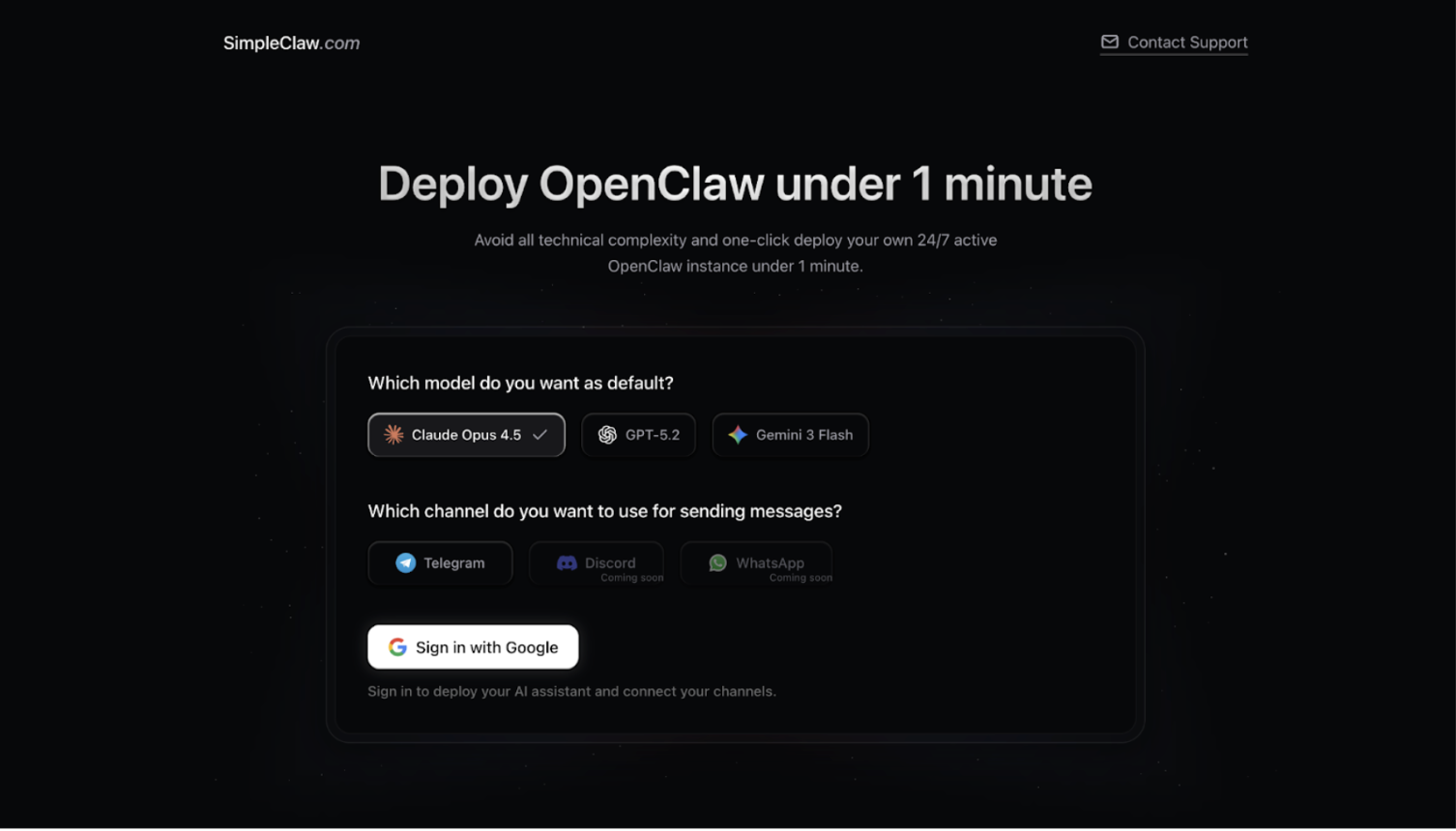
If you don't want to occupy your own computer resources and also don't want to buy and tinker with a server yourself, this third-party SaaS platform is tailor-made for you.
Installation Ease: ⭐⭐⭐⭐⭐
- Full black box: You don't need to know what SSH or ports are. After paying the subscription fee, the platform automatically deploys it in the background.
- 1-minute launch: In the time it takes to drink some water, you get a configured, 7x24-hour online cloud Agent.
Feature Completeness: ⭐⭐⭐
- Adequate but closed: Provides standard OpenClaw conversation features, supports 7x24-hour cloud online status. However, because it's a managed environment, you don't have server Root permissions and cannot extend other functionalities.
Security: ⚠️ Medium (Third-party managed)
- Trust cost: After all, it's a platform operated by a third-party individual or small team. Your data privacy and Agent's operational stability depend on the service provider's reputation, carrying certain risks of abandonment or privacy breaches.
Price Cost: ⭐⭐
Subscription-based: Price is approximately $10/month (plus top-up fees). Compared to buying your own server, the premium here is mainly for "manual service fees" and "peace-of-mind fees".
Recommended Tutorial: https://x.com/saviomartin7/status/2018437642820731148
Tier 2: Self-built Cloud Host VPS (The Choice for Cost-effectiveness & Stability)
If you want your Agent to be online 24/7 and pursue the security of data isolation and cost-effectiveness, buying a cloud server from a major provider is the best choice.
3. Tencent Cloud Lighthouse Server — The God of Direct Network Connection
Installation Ease: ⭐⭐⭐⭐
- Application template: Tencent Cloud provides an image integrated with the OpenClaw environment, solving Node.js dependency installation issues.
- Network smoothness: Directly select the "Silicon Valley" node when purchasing, comes with a pure overseas network environment. You don't need to configure any proxies, connections to Telegram/Discord are extremely stable.
Feature Completeness: ⭐⭐⭐⭐⭐
- Full Linux permissions: Possess independent server Root permissions, 24/7 online, excellent network environment, high scalability.
Price Cost: ⭐⭐⭐⭐
- Approximately ¥40/month. This is the preferred solution for long-term stable operation, adaptable to different budgets.
Security: 🔒 High (Tencent endorsement)
- Major provider guarantee: Backed by Tencent Cloud infrastructure, independent server resources, well-configured security group policies.
Recommended Tutorial: https://x.com/starzq/status/2019693762868588782
4. Alibaba Cloud ECS — The King of Chinese Tutorials & Ecosystem
Installation Ease: ⭐⭐⭐
- Most comprehensive tutorials: From buying the server to configuration, the official documentation is detailed down to every button, even including video tutorials.
- ⚠️ Note: Must choose Singapore or US nodes, otherwise internet search and TG functions will fail.
Feature Completeness: ⭐⭐⭐⭐⭐
- Ecosystem integration: Besides standard features, official tutorials also cover localized office scenarios like DingTalk integration.
- Model advantage: Perfectly integrates with Alibaba Cloud's "Bailian" platform (Tongyi Qianwen Qwen model), strong Chinese comprehension ability and low cost.
Price Cost: ⭐⭐⭐⭐⭐
- Frequent newcomer promotions, as low as ¥99/year.
Security: High (Alibaba endorsement)
- Major provider guarantee: Official documentation and images maintained by Alibaba Cloud, data security is guaranteed.
Official Tutorial: https://help.aliyun.com/zh/simple-application-server/use-cases/quickly-deploy-and-use-openclaw
5. Google Cloud (GCP) — The Tech-savvy Free Rider
Installation Ease: ⭐
- Bitter first, sweet later: Pure Linux system, you need to configure firewall rules yourself, manually install the Node.js environment, and handle dependency errors.
Feature Completeness: ⭐⭐⭐⭐⭐
- Highest degree of freedom: Completely clean environment, suitable for developers for deep customization.
Price Cost: ⭐⭐⭐⭐⭐
- Utilize Google Cloud's $300 new user credit (valid for 90 days), theoretically zero cost.
Security: High (Google endorsement)
- Top-tier infrastructure: Google's global infrastructure, physical security is impeccable.
Recommended Tutorial: https://x.com/starzq/status/2019693762868588782
Tier 3: Local Deployment on Idle Hardware
6. Idle Computer Command Line Version — The First "Ten Million Views" Tutorial in the Chinese-speaking Region
Positioning: Utilize idle Mac Mini or old computers to create a "full-permission" AI employee.
It's not packaged software like ClawApp, but a "bare-metal version" that runs deep in the system directly via the command line.
Installation Ease: ⭐⭐ (Requires code knowledge)
- Script installation: Requires using the terminal to run script commands and complete configuration in the command line interface.
- Repurposing waste: Many people's old Mac Minis or outdated laptops are perfect for running this.
Price Cost: ⭐⭐⭐⭐⭐
- Software is open-source and free, only need to cover the electricity cost of the idle computer.
Feature Completeness: ⚡ OS-level Permissions
- Breaks ecosystem barriers: It can directly call your computer's local file system, operate your local browser, help you write scripts and execute them. It's not just a chatbot, but the "shadow administrator" of your operating system.
- Extremely high ceiling: Theoretically, it can help automate any local operation for you.
Security: High
- Privacy level: High. Data stays completely local, not forwarded through any cloud. But note that prompts are sent to the cloud LLM.
- Operational level: Low. This is the particularity of this solution. Because it's a command line directly connected to the OS, the AI gains system-level read/write permissions. If the model hallucinates or is maliciously induced, it might accidentally delete local files, read browser cache, or private keys.
Recommended Tutorial: https://x.com/lxfater/status/2015949596544110974
Final Words: Don't Let Technical Barriers Block Your Path to the Future
In 2026, social division of labor is being completely restructured by AI Agents.
Whether you are a complete beginner, a convenience-seeking free rider, or a tech enthusiast wanting to play with AI in creative ways, there is always a deployment solution that perfectly matches your "wallet thickness" and "hands-on ability".
Never let those few lines of code, the few dozen dollars for server fees, or the so-called "technical barriers" become the reason you are left behind by the times.
Your AI employee is ready, just waiting for you to wake it up!
Risk Warning: This article is merely an information summary and does not endorse the authenticity, accuracy, or risks of any referenced third-party content.


