






SignalPlus: How to ensure profits? It is recommended to use the "Profit Locking Tool".


Students are probably concerned when placing orders: how to lock in profits and control risks.
SignalPlus (t.signalplus.com) has prepared a powerful profit locking tool, DDH, for everyone.
Let me guide you step by step on how to use DDH to automate risk management and lock in profits.
Introduction to DDH
Dynamic Delta Hedging (DDH for short) is a tool developed for traders to achieve automated risk management. Basically, traders can use DDH to control the delta exposure of their accounts within a specified range, thus controlling the overall risk of their investment portfolio.
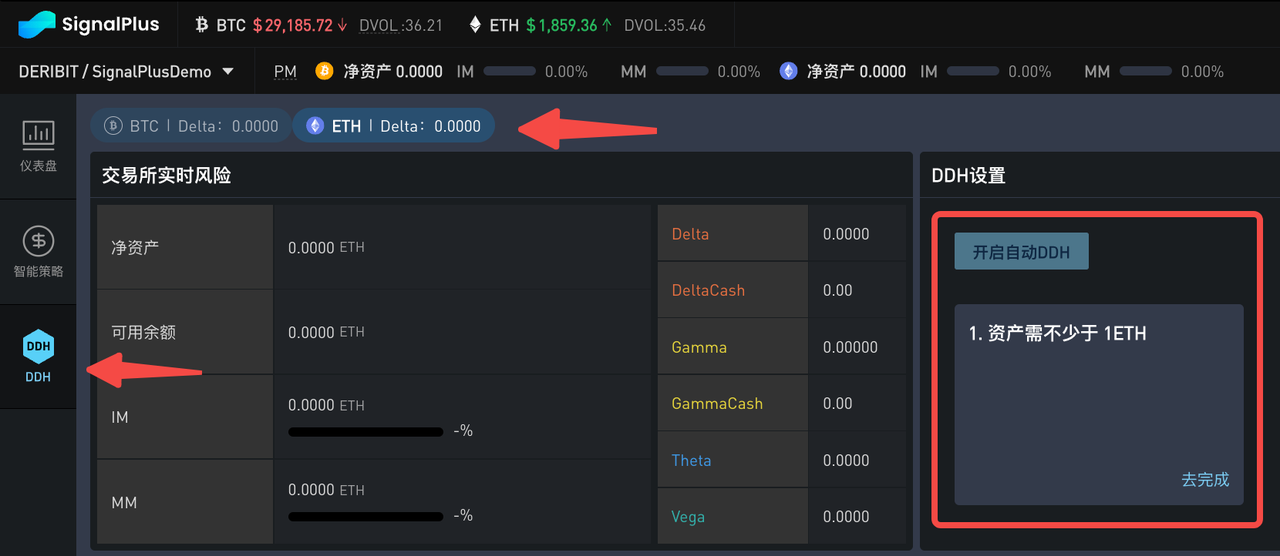
First, you select DDH on the left and then choose the currency to hedge. Please note that you must meet certain requirements to enable automatic DDH.
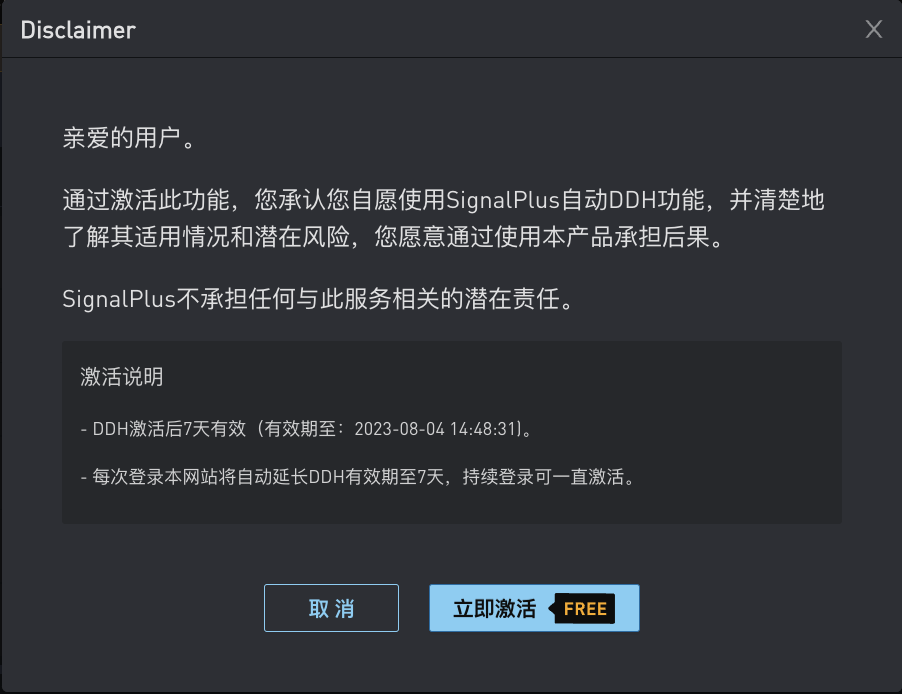
After clicking the "Enable Automatic DDH" button, please read the disclaimer carefully. If you have no objection, you can click to activate this feature immediately. It is worth noting that if you do not log in to your account within 7 days, this feature will be automatically disabled.
DDH Thresholds
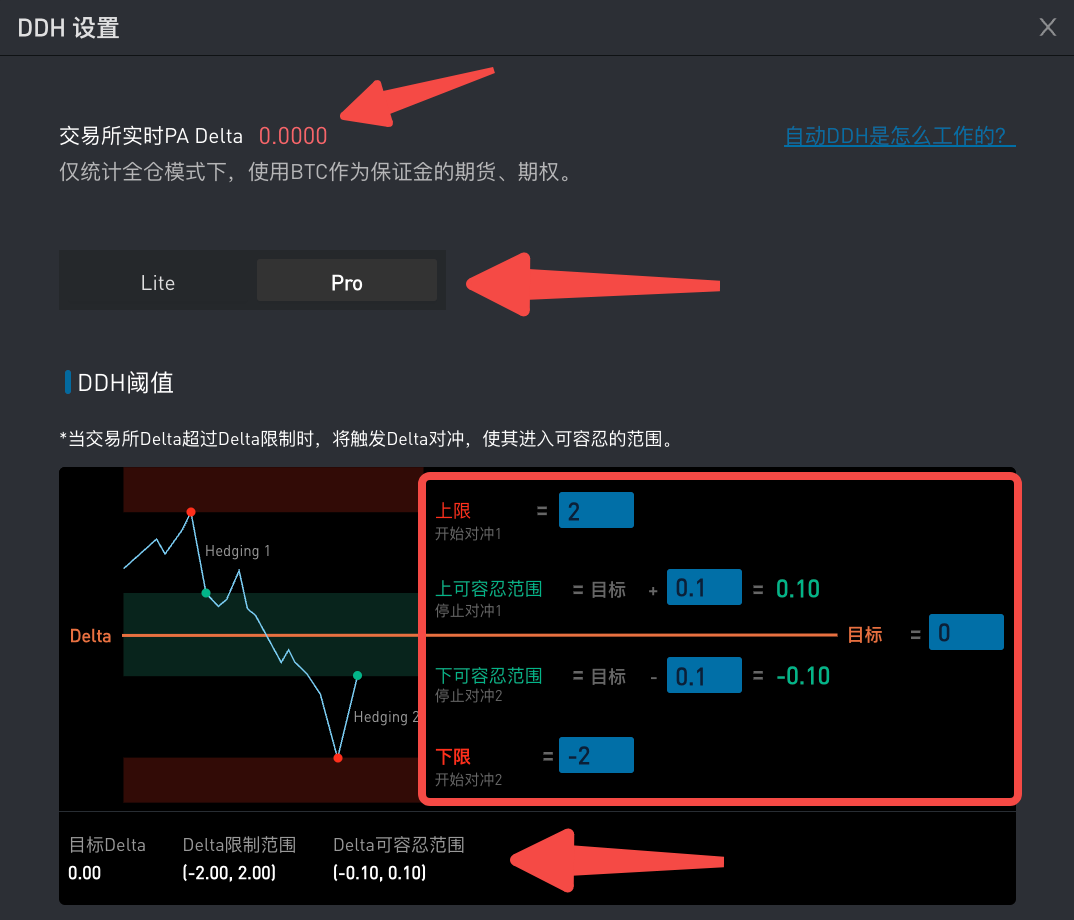
In the settings interface, the top number displays the real-time delta of your account obtained from the exchange, with a refresh frequency of less than 5 seconds. We recommend using the Pro mode for more custom settings.
First, you need to enter the upper and lower limits. Once the exchange delta reaches any of the limits, the delta hedging mechanism will be triggered. Then you need to set a target. Finally, around this target, you can set the upper tolerable range and the lower tolerable range; once DDH hedging is triggered, your delta value will return to this tolerable range. Please note that all limits and thresholds do not have to be symmetrical and can be adjusted according to your needs.
If, during the hedging process, the delta returns to the tolerable range due to market fluctuations, effective orders will be canceled and hedging will stop.
Essentially, once the account Delta reaches the red zone (Delta limit range) set by the threshold, our platform algorithm will use futures to bring the account Delta back to the green zone (Delta acceptable range).
DDH Order Settings
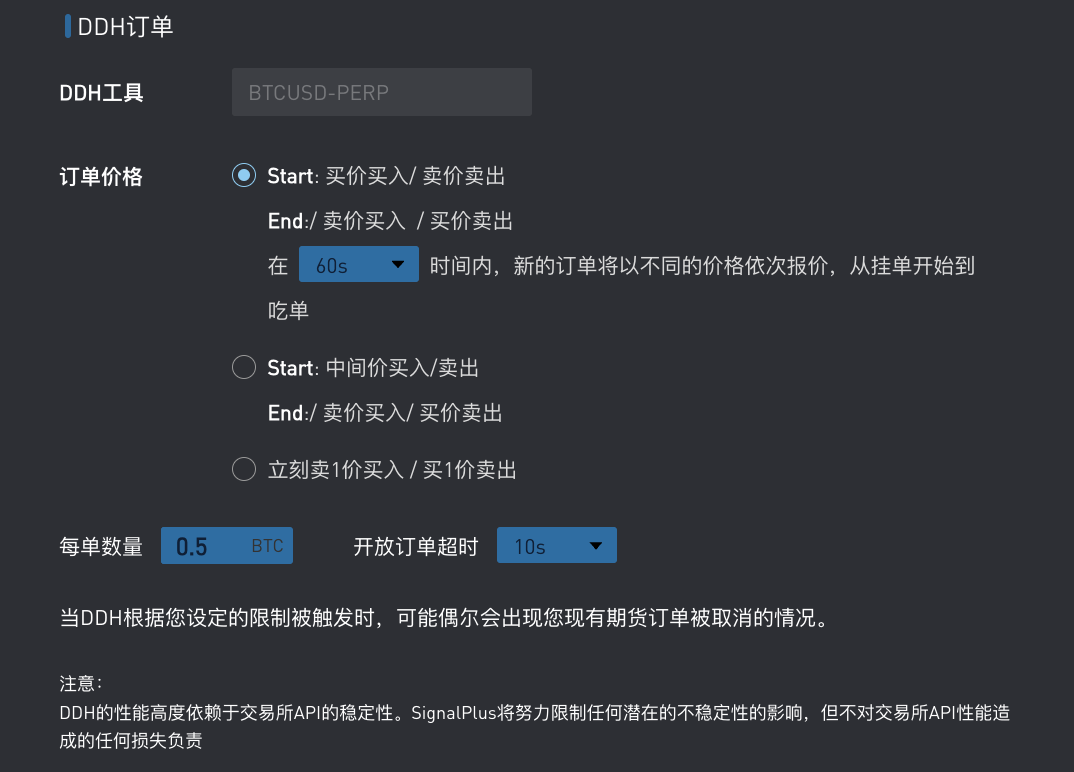
Next, you can set the detailed information of the DDH order. Currently, we only support perpetual futures as the DDH tool. Regarding the order price, we have three options -
The first one is the most conservative pricing hedge - placing limit orders based on the best bid price (buy) and best ask price (sell); if all preset limit orders are not filled within the specified time, it will gradually switch to market orders. This largely avoids the quantity of order eating and corresponding fees, but if the price continues to deviate, the hedging time will be longer and may incur higher costs.
The second one is to start hedging with the mid-price as the limit order, and if the order is not filled within the selected time, it will eventually switch to a market order. This method is easier to execute than the first one.
The last one is the fastest, immediately hedging with market orders, which is also the order mechanism in Lite mode. This method can hedge Delta risk the fastest but may incur higher costs due to order eating.
In addition, you can also input the quantity per order. If the Delta exposure is greater than the quantity per order, each order will be hedged according to the preset order quantity; if the Delta exposure is less than the quantity per order, the order will be hedged according to the exposure level. Specifically, assuming the Delta exposure is 2 -
If the quantity per order is set to 0.5, then there will be 4 orders of size 0.5 executed successively.
If the quantity per order is set to 5, then only 1 order of size 2 will be hedged.
Finally, you also need to set the open order timeout, which is the time frequency for canceling and re-ordering valid orders when the current pending order price is not filled. After the old order is canceled, a new order will be re-ordered at a price closer to the market price. As shown in the figure below, 1. Choose the first order price trading method, stipulating that the quotation will be traded in sequence within 60 seconds; 2. Set the open order timeout to 10 seconds. Therefore, within the total transaction time range of 60 seconds, if the previous order is not filled, the order will be canceled and re-ordered at a price closer to the market price every 10 seconds. If it is still not filled after 60 seconds, it will be filled at the market price.
Telegram Notification
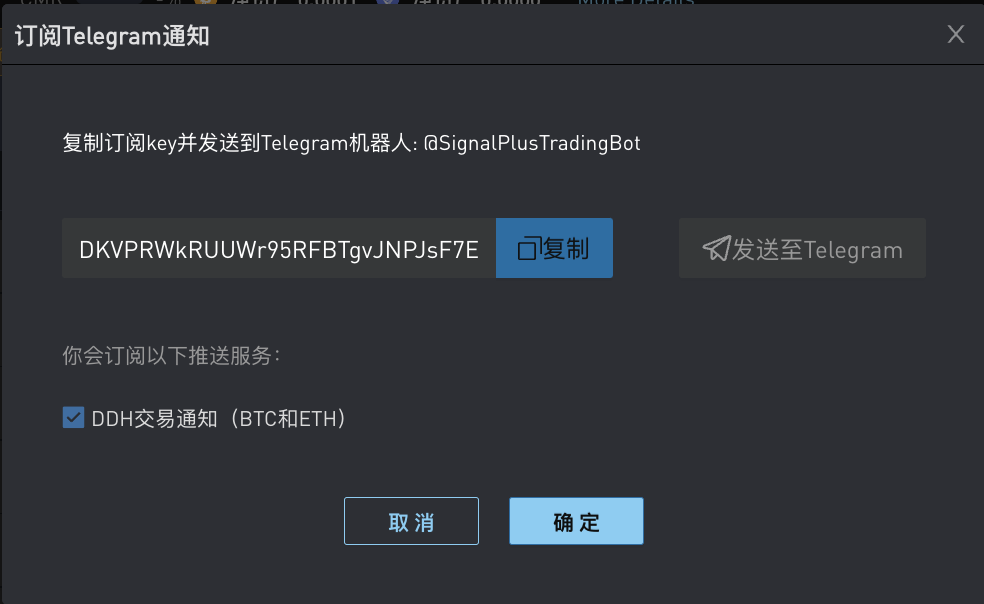
After enabling the automatic DDH function, we recommend subscribing to @SignalPlusTradingBot on Telegram. After subscribing, the system will automatically send notifications on Telegram when DDH is triggered or orders are filled.
To subscribe to notifications, first click on the Telegram icon in the upper right corner of the page. Then click the "Send to Telegram" button and paste the subscription key into the chat box with @SignalPlusTradingBot. The bot will reply "Subscribed" as a sign of successful subscription.
Place your order now and experience the feeling of being confident before placing an order!
Free options trading tools / options stress testing: t.signalplus.com

You can search for SignalPlus in the Plugin Store of ChatGPT 4.0 to get real-time encrypted information. If you want to receive our updates instantly, please follow our Twitter account @SignalPlus_Web 3, or join our WeChat group (add assistant's WeChat: chillywzq), Telegram group, and Discord community to communicate and interact with more friends.
SignalPlus Official Website: https://www.signalplus.com


