Detailed Explanation of Premo Test Framework


BitXHub is a cross-chain technology platform independently developed by Qulian Technology, which provides an interoperability solution based on heterogeneous alliance chains. In order to ensure that the functions of the BitXHub cross-chain platform in the daily iteration process meet user needs, and to find and correct as many problems as possible before release or delivery, the Premo testing tool came into being. Premo is mainly implemented based on BitXHub's own gosdk, which is easy to expand and maintain. This article mainly focuses on the three aspects of functional testing, performance testing and automated testing to give an overview of Premo's testing framework.
【Architecture overview】
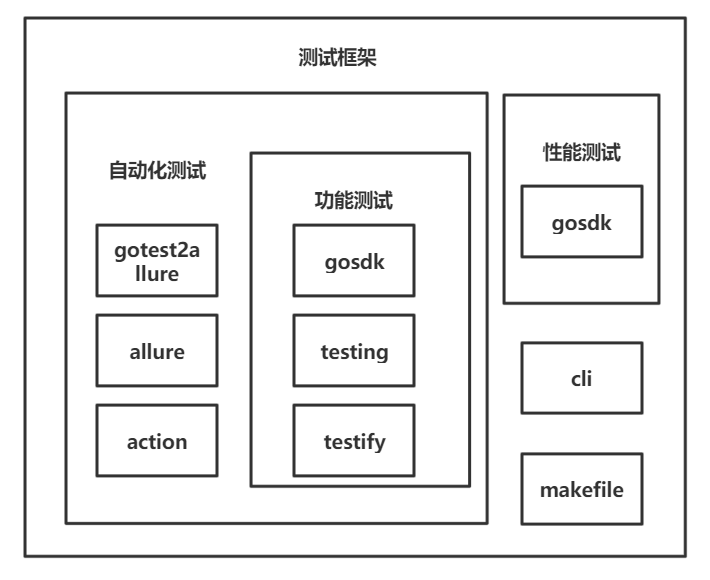
The Premo test framework is shown in the figure below. Test-based content is mainly divided into "functional test" and "performance test". The functional test is mainly based on testing and testify to realize the overall test framework, and the communication and calling of the BitXHub cross-chain platform based on gosdk; the performance test is mainly realized through coroutines on the basis of gosdk. Premo further implements continuous integration testing on the basis of functional testing, and the continuous integration testing part is mainly implemented with GitHub Actions.
【function test】
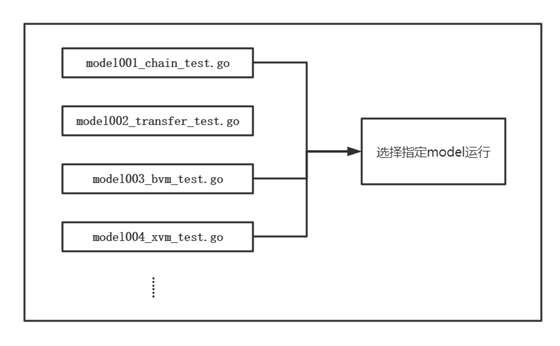
The functional testing module is mainly implemented by the BitXHub project's own gosdk, testify open source library and testing library. The functional test module is divided into multiple test files according to the function points of the test. The test cases in each test file are included in a test suite. In daily testing, different suites can be run based on the function points you need to test, as follows As shown in the figure. For example, all test cases in model1001_chain_test.go are included in the model1 suite. If you need to run chain-related test cases, you only need to run the model1 suite.
▲Parallelization test
With the continuous expansion of the project, the number of test cases is also increasing, and the time it takes to return to the full test cases is getting longer and longer. The method of sequential testing is becoming more and more inefficient in the rapid iterative version development. Parallel testing can effectively solve this problem, but this will introduce a new problem, that is, the coupling between test cases. Many use cases will not expose problems in the process of serial testing, but once parallel testing is performed, concurrency problems will appear.
Taking the BitXHub cross-chain platform as an example, the BitXHub cross-chain platform will maintain a nonce value according to the account address in the process of receiving cross-chain transactions to achieve the orderliness of cross-chain transactions, and the nonce value will increase every time a transaction is received 1. If the received nonce value is less than the expected nonce value, the BitXHub cross-chain platform will discard the transaction. On the contrary, if it is greater than the expected nonce value, the BitXHub cross-chain platform will temporarily store the transaction until the nonce reaches the expected value. This will require us to artificially maintain the nonce value in the parallel test case. Therefore, a very important point in parallel testing is the need to maintain the relative independence between use cases. How to maintain the relative independence of use cases needs to be adapted to the local conditions of the project itself.
【Performance Testing】
An important point to measure whether a cross-chain service system is reliable and stable is the performance index of the cross-chain itself. According to the above requirements, Premo has implemented a complete set of performance testing solutions based on BitXHub's own gosdk to verify whether the performance of the BitXHub cross-chain platform meets the requirements. The performance test in Premo is mainly a stress test, which verifies the performance of BitXHub in handling cross-chain transactions by sending a large number of cross-chain transactions to the BitXHub cross-chain platform. The overall performance test is mainly divided into 3 steps, which are application chain preparation, sending cross-chain transactions and counting TPS.
▲ Application chain preparation
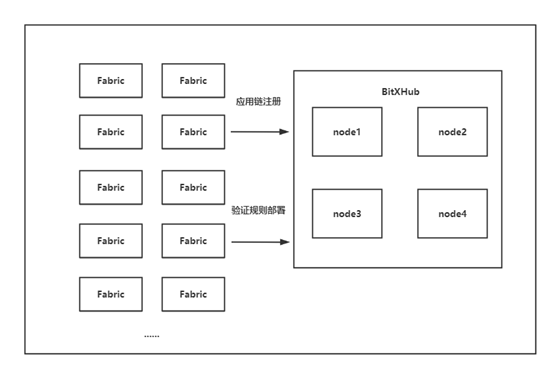
Before sending cross-chain transactions, it is necessary to pre-register a certain number of application chains to the relay chain according to different transaction types, so that Premo can use the identities of these application chains to send cross-chain transactions to the relay chain through the SDK. After the application chain is successfully registered, corresponding verification rules need to be deployed to verify the validity of the transaction in the relay chain.
 ▲Send cross-chain transactions
According to the preset TPS and the number of application chains, the number of cross-chain transactions that an application chain needs to send to the BitXHub cross-chain platform within one second can be calculated. The preset transaction type can construct the corresponding transaction body. Note that due to the orderly requirements of cross-chain transactions, we need to maintain the nonce value of each cross-chain transaction in the transaction body. At the same time, in order to send cross-chain transactions more evenly, Premo will send some cross-chain transactions to the BitXHub cross-chain platform every 50ms. For example, Premo needs to simulate 20 application chains to send a total of 2000 cross-chain transactions per second. The application chain needs to send 100 cross-chain transactions within 1 second, and each application chain will send 5 cross-chain transactions every 50ms.
▲ Statistics TPS
Statistical TPS is achieved by subscribing to block events on the BitXHub cross-chain platform. After subscribing to block events, each block issued by the BitXHub cross-chain platform will be pushed to Premo. Premo calculates TPS by counting the number of transactions in the block. The delay of each transaction = the time to receive the block - transaction Time to rub. Premo prints TPS and average transaction latency per second based on the above information.
【automated test】
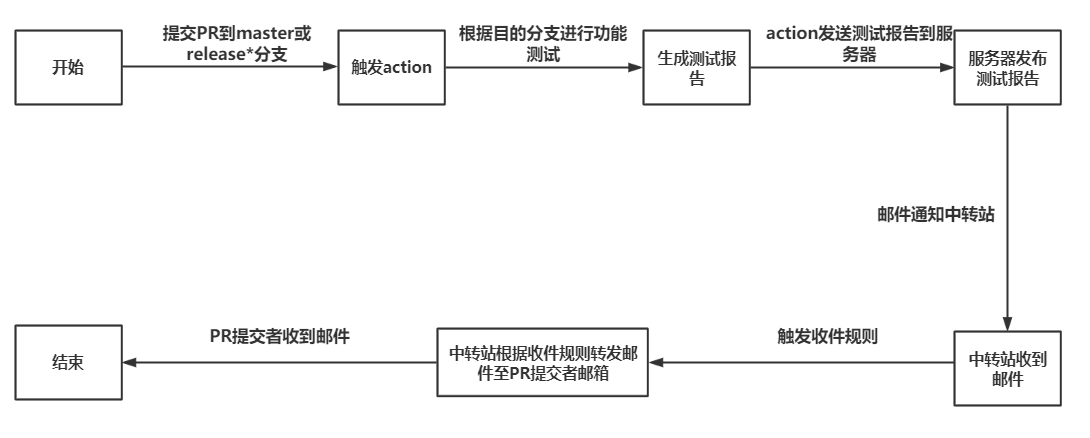
The main function of the automated test is to complete the test of the full functional test cases when any branch is promoted to the master branch or the release* branch, and at the same time generate a corresponding test report according to the test results, and publish the test report to the server. form to notify the submitter of the PR.
▲Make command
Premo adds functional testing to the make command, and a full functional test can be performed through the make command. At the same time, the make command generates a corresponding test report according to the test results.
▲GitHubActions
text
▲allure-server
The open source Allure Report Server on GitHub supports publishing test reports through GitHub Actions, and allure-server supports docker.
"There is a lot of work to be done above, we can analyze it bit by bit"
(1) Trigger action according to PR:
For details, refer to the relevant chapters of the official documentation Eventsthat trigger workflows of github actions;
(2) According to the purpose branch function test:
In the action, we can obtain the target branch name. The test cases of Premo are maintained according to the version of the BitXHub cross-chain platform, so we only need to pull Premo according to the target branch name for functional testing;
(3) Release test report:
Publishing test reports is mainly done through allure-server, which has been mentioned above. One thing to note is that the address of the server corresponding to allure-server cannot be exposed, otherwise it will bring instability to the server. This problem can be solved by setting [Secrets] in the warehouse [Setting];
(4) Email notification:
Email notifications are common in GitHub Actions, just use the corresponding action. It should be noted that due to the format of SMTP used, the account number and password of the mailbox cannot be disclosed. This problem can be solved by setting [Secrets] in the warehouse [Setting]. In the process of email notification, you need to know the account password of the destination email, and you also need the email to enable SMTP service. In this case, it is not advisable to configure the email of the PR submitter in the action.
A suitable solution is: through the sending and receiving rules of the mailbox itself. Taking Tencent Enterprise Mailbox as an example, the mailbox supports automatic forwarding based on the content of the email. We only need to carry the submitter's github name (or other identity information) in the email, and the sending and receiving rules filter based on the name, and automatically forward the email to the PR submitter. Through the above method, there is no need to specify different email addresses according to different PR submitters in the action, only need to send the email to"transfer station"That's it.
After completing the above work, you only need to maintain the Premo function test cases according to the branch of BitXHub to complete the corresponding automated testing. The specific process is shown in the figure below:
text
About the Author
About the Author
Zhu Weijie
FunChain Technology Data Grid Lab BitXHub Team