It is necessary to operate on the chain, add a security lock to the wallet key



In the Web3.0 world, the security of private keys and seed words is the most important. Once in possession of them, one can access one's digital assets at will, so their loss or theft could result in huge damage to the user's property.
With the rise of mobile wallet applications in the Web 3.0 space, it is critical to understand the various security mechanisms that protect these keys.
This article summarizes the different levels of security protection offered by Web3.0 mobile wallet applications. Through the research of nine popular open source mobile wallets, we discussed how these popular wallets implement the user's private key or mnemonic phrase in practice, from simple password protection to hardware-supported trusted execution environment, etc. of security protection. Through research, we found that some of these security protection mechanisms can effectively solve some common private key theft attacks. However, we also found that threats from the system level (such as exploiting root, etc.) were largely ignored.
Wallet security core: private key protection
The most important data in the mobile wallet application are the private key and seed phrase.
Therefore, the most serious threat to mobile wallet applications is the leakage of their private keys or seed phrases. To properly mitigate this threat, a well-designed mobile wallet application should have a systematic approach to securing private keys during storage or usage phases.
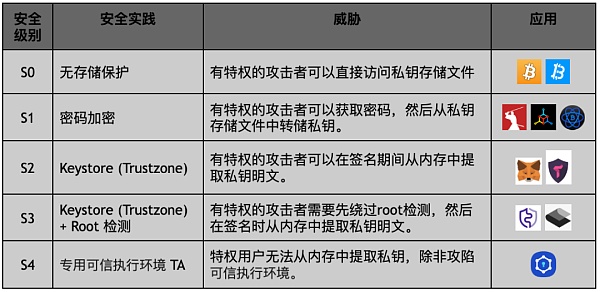
In the above table, we summarize the common practices used by Web3.0 wallets to protect users' private keys on Android mobile devices. This table summarizes common practices for private key and seed phrase protection in wallets on Android mobile devices. The security practices for each level are listed in order of increasing security level and include corresponding threats that it does not fully address.
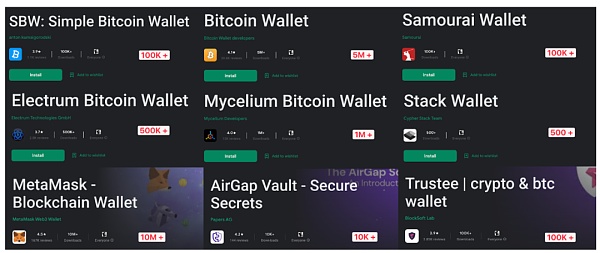
By examining nine popular open-source Web 3.0 wallets, we can categorize them into different levels of security and gain a better understanding of how these practices apply in the real world.
The image below also shows the names of these mobile wallet apps and their download counts on the Google Play Store.
Wallet Security: From S 0 to S 4
secondary title
S 0 (no memory protection)
The security practice of S 0 level is to store all users' private information in the storage space of the application, including private keys and mnemonic phrases, etc. This usually prevents unprivileged users or applications from directly accessing storage files.
image description
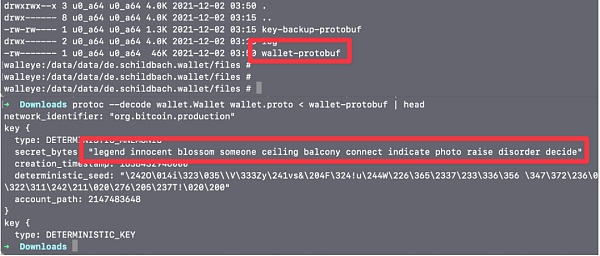
Restoring Bitcoin wallets from Protobuf files
It is worth noting that gaining privileged permissions on an Android device is not impossible. In addition to users actively choosing to root their devices and being further abused by malicious apps, cybercriminals exploiting vulnerabilities to gain permissions is a new threat on Android devices.
image description
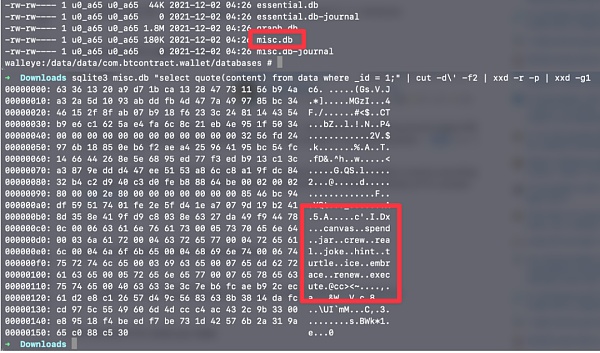
Restore Simple Bitcoin Wallet from Sqlite Database
secondary title
S 1 (password encryption)
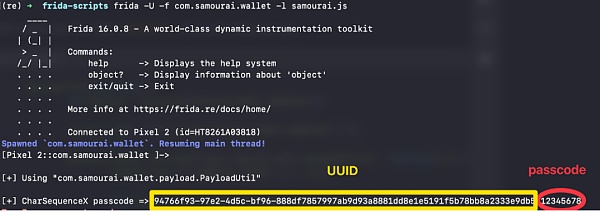
The S1 level of wallet security is to use a user-defined password to encrypt the storage file containing the private key and mnemonic phrase, which prevents non-privileged users or applications from directly accessing the storage file. However, when the application starts, the stored file must be decrypted, allowing a privileged user or application to hack into the wallet and intercept the encrypted password. This allows them to decrypt locally or directly brute force the encrypted key file.
image description
secondary title
S 2 [Keystore(Trustzone)]
To prevent the encryption key of the keystore file from being intercepted in memory by an attacker, some wallet applications, such as Metamask, use the Android Keystore system to generate and use encryption keys.
The Keystore system is implemented by a trusted application that runs in the Trusted Execution Environment (TEE) of the Android system. This environment is isolated from the main operating system and protected by hardware-based security features. By using the Keystore system, encryption or decryption of stored files occurs in the TEE, reducing the possibility of the encryption key being compromised.
secondary title
S 3 [Keystore(Trustzone)+root detection]
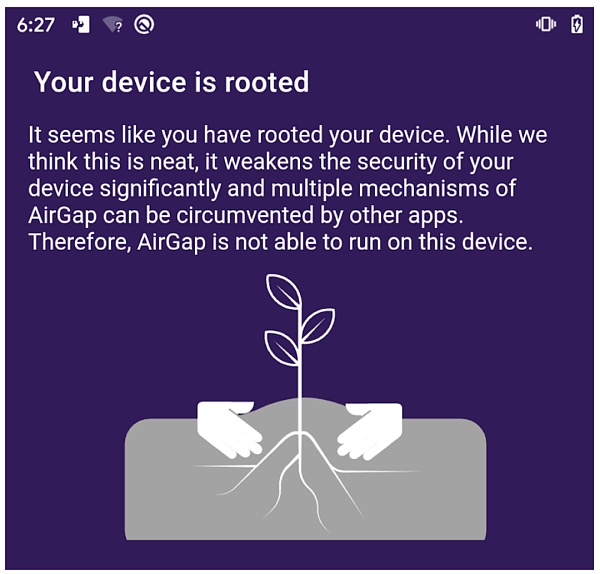
To increase the security of S2 level protection, some wallet apps go one step further to protect user assets by checking whether the mobile device is rooted or not. This detection helps to ensure the integrity of the device, because a rooted device is more easily exploited by an attacker.
secondary title
S 4 (Dedicated Trusted Execution Environment TA Trusted Application)
The highest level of security practice in mobile wallet applications is to use a dedicated Trusted Execution Environment (TEE) to store and process private key information. This is achieved by installing a dedicated TEE-based Trusted Application (TA) on the device.
For example, this method of protection is currently used by the Samsung blockchain application on some high-end Samsung smartphones. This approach provides additional protection because the private key information is stored and used only in the TEE, which is isolated from the main operating system and only accessible by vendor-trusted code. Even privileged users or applications cannot directly access this information. However, this approach is limited in that it requires smartphone manufacturers to provide specific interfaces for wallet developers to use the TEE.
Mobile Wallet App Security
In S 3 level protection, we mentioned that root detection can be used together with Keystore system to protect user's private information. Note that we consider root detection to be an important aspect of ensuring a device maintains fundamental integrity and should be implemented in conjunction with any security practice to ensure a higher level of protection.
However, it is important to note: root detection techniques may vary and are not necessarily effective. For example, while Airgap Vault r was rooted on our test device, Samourai Wallet did not successfully detect rooted devices in the same test environment.
Furthermore, this study only includes software wallet applications on mobile devices without any additional hardware implementation. Both hardware-based Web 3.0 wallets and cold wallet security offer attractive security features, and each deserves its own article in detail.
Summarize
Summarize
In this paper, CertiK's team of experts analyzes the threats faced by Web3.0 wallet applications on mobile devices, especially the storage of private keys and related potential threats. Through testing and research on nine different popular wallet applications, CertiK's team of experts revealed the level of security employed by each application, and found that most major wallets use hardware-backed key protection technology to resolve encryption. Key storage issues, such as the Keystore system on Android.
However, we also noticed that most wallets do not check the integrity of the device, such as whether it is rooted, which may cause security problems when performing private key operations in memory. In addition to the five levels of security practices we summarize in this article, we believe wallet developers should also pay attention to how to take full advantage of the Trustzone design on Android to better mitigate common risks. We will continue to introduce this topic in future articles and assist developers to better protect users' assets.