



Build dApps with secure data entry on Binance Smart Chain


In April 2019, the famous cryptocurrency exchange Binance launchedBinance Chain), a network built and optimized for the rapid exchange of assets, and where the BNB token was born. On Binance Chain you can
Send and receive BNB tokens
Issue new tokens
Send, receive, burn/mint and freeze/unfreeze tokens
Propose to create a trading pair between two different tokens
Send orders to buy and sell assets through trading pairs created on-chain
Binance Smart ChainBinance Smart Chain(BSC), a network that uses the Proof of Stake Authorization (PoSA) consensus algorithm and is EVM-compatible, enabling smart contract developers to build programmable dApps that are natively integrated with Binance Chain.
On the one hand, this dual-chain architecture enables fast transactions on the asset exchange side, and on the other hand, it also supports smart contracts. The Binance team actually coined the term "CeDeFi" or call it "centralized decentralized finance" to describe this hybrid approach, which strikes a tradeoff of using less decentralized architecture To achieve greater transaction throughput, while still ensuring that developers can deploy applications in a permissionless manner, and can use the same composable tools in Ethereum, such as Solidity andChainlink price feed。
Binance Smart Chain Chainlink price feedfirst level title
secondary title
tools we will use
Since BSC is EVM compatible, we can use the same tool set that we would use in the Solidity development environment, such asTruffle,Hardhat,MetaMaskwait. In this tutorial, we will use the Python smart contract development frameworkBrownieDeveloped on BSC, because the Binance testnet currently does not support Chainlink price feeds, and the Brownie framework has powerful forked chain features that can be used locally.
If you are interested in using Truffle and Hardhat development on Binance Smart Chain instead of Brownie, you can check outForked chain function of ganache-clisecondary title
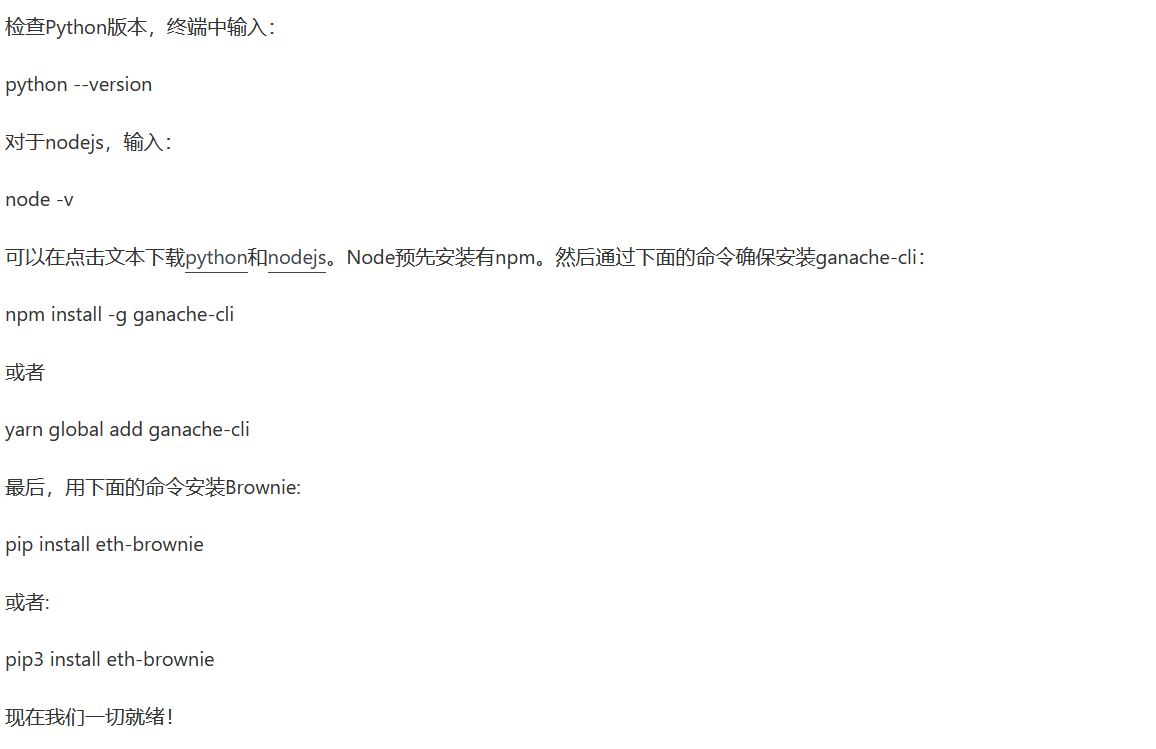
Require
python3
nodejs
ganache-cli
brownie
getting started guide
Now that we've got everything set up, move on to unboxingbrownie's chainlink-mix. This is a boilerplate template for using Chainlink smart contracts. If you want to know more, you can read atHow to deploy smart contracts on any blockchain using python in our blog post。To use Binance Smart Chain’s mainnet or testnet, BNB tokens are usually required, which is similar to using ETH on the Ethereum blockchain. When deploying smart contracts, BNB tokens are required.
We'll be doing everything 100% locally, so you don't need any testnet tokens like ETH, LINK, or BNB to get started.
First, we need to create the Brownie mix project:
brownie bake chainlink-mixcd
chainlink
Now we enter the project. If we run the ls command, we can see the contents of the directory.
build: This is the folder the project uses to keep track of deployed smart contracts and compiled contracts
contracts: the source code of the contract, usually written in Solidity or Vyper language
interfaces: The interface folder needed to interact with the deployed contract. Every interaction with a contract requires an ABI and a contract address. Interfaces are a great way to get the ABI of a contract
scripts: the scripts we created to automate the contract process
tests: test
brownie-config.yaml: This file provides Brownie with all the information it needs to understand how to treat our smart contract. What blockchain network do we want to deploy to? Do we have to set any special parameters? All these things are set in this configuration file.
requirements.txt , README.md , LICENSE ,and files like .gitignore can now be ignored. You'll learn what they're used for during the exercises.
secondary title
Add a forked network
In order to use Binance Chain, we need aRemote Procedure Call (RPC) linkor host field. This is a connection that makes an API call to connect to Binance Smart Chain. You can also run your own coin if interestedAn Smart Chain Nodeand connect to that node.
we canFound in their docs for Binance ChainThe RPC link. We also need the ChainID. Now, we use the following:
host=https://bsc-dataseed.binance.org/ chainid=56
Finally, we will need the specific contract address for the Chainlink price feed to be used. Brownie's chainlink-mix project comes pre-installed with Binance ETH/USD price feeds, but if you want a list of all Chainlink price feeds on Binance, you can check the Binance or Chainlink documentation for more information. Looking at the brownie-config.yaml file, you will see a section called binance-fork in the networks field. Here are all the variables we need to use the Binance fork chain.
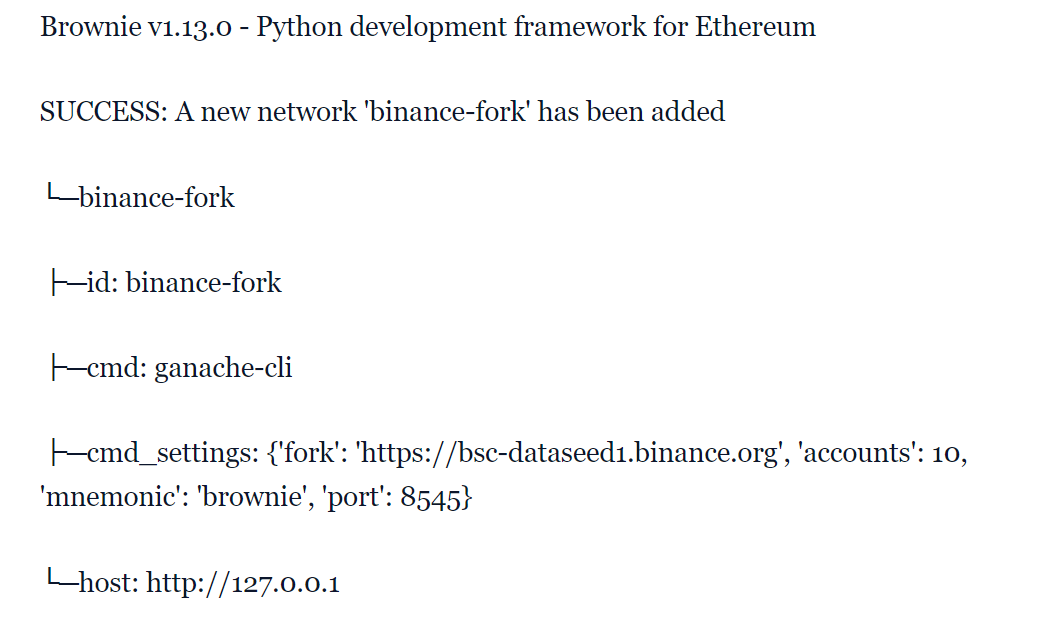
Now, we're going to tell Brownie to connect to Binance Chain, but we're going to fork the chain. Forking a chain means copying the chain and running it locally so we don't pay any gas fees and can iterate quickly on tests. But this also means that once the forked chain goes offline, all data will be deleted! We can add a fork of Binance Chain to the Brownie network with the following command:

This will run a local ganache-cli chain on port 8545 of localhost. It will be used when deployinghttps://bsc-dataseed1.binance.orgas a fork source. If done correctly, you should see something like this:
secondary title
deploy contract
Now that everything is set up, we can deploy and read contracts on the local ganache fork. exist scriptsfolder, there is adeploy_price_consumer_v3.pyscript. We can run it with the following command:

You should see output similar to the following
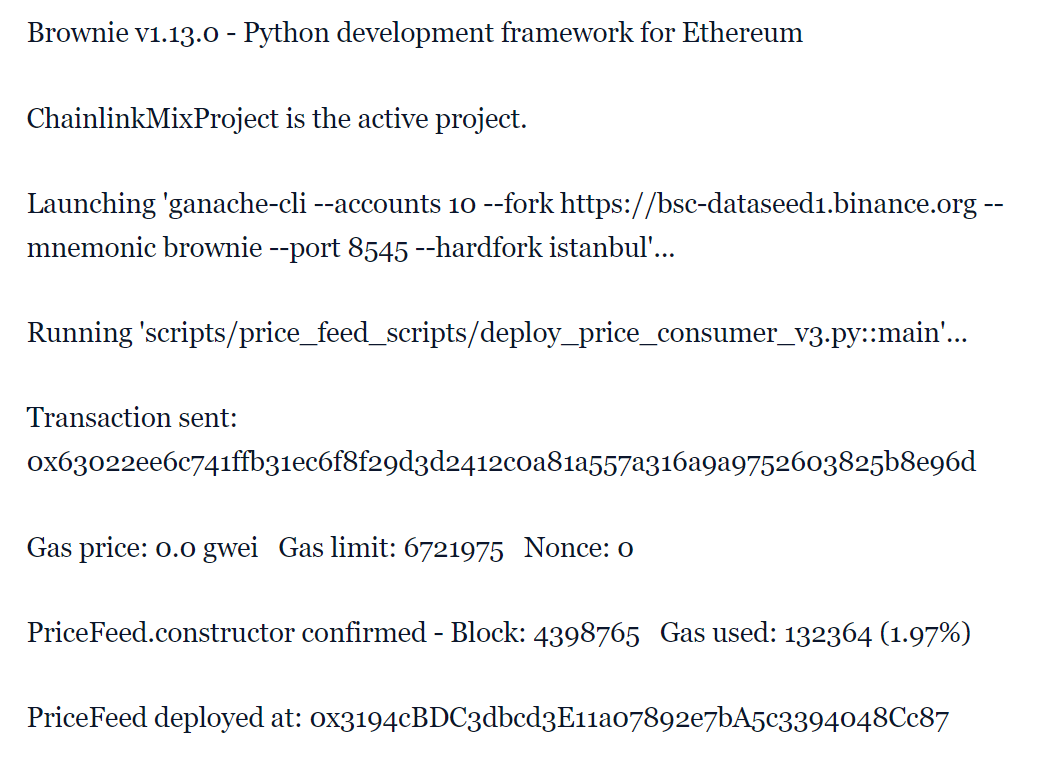
So we've just done:
Fork the Binance Chain and run it locally
Deploy smart contracts to it
and read the price of ETH from it
The current price of ETH is 135462000000
secondary title
further
Now that you know how to deploy smart contracts using Binance Smart Chain, you can also delve deeper into BSC, or use other sidechains like Matic, xDai, and other Layer 2 networks. If you prefer Hardhat and Truffle frameworks, see if you can execute ganache-cli commands in those frameworks and run some local tests. There are many hackathons coming up, so be sure to join them for opportunities to collaborate with other talents in the field, win some awards, and develop yourself as a real contract developer.
If you want to continue to expand the functionality of smart contracts, please visitChainlink Developer Documentationand joinDiscordTechnical discussion in . If you build cool projects using Binance Smart Chain, Brownie, Truffle, Hardhat, or any other Chainlink integration, make sure to tag us @chainlink so we can see the awesome work you've done!